 Visual Paradigm Desktop |
  Visual Paradigm Online
AI-POWERED PRODUCTION-READY DATABASES
Instead of messy manual work, our AI guides you through a simple 7-step journey—from your first thought to a fully tested schema.
DB Modeler AI is an AI-powered database modeling tool designed to bridge the gap between abstract business requirements and production-ready SQL code. It automates the complex, iterative, and error-prone process of database design, guiding you from an idea to a fully normalized, tested schema in a seamless, 7-step journey.
The tool’s core purpose is to accelerate development, improve data quality, and democratize database design by leveraging AI to handle the heavy lifting while giving the user precise control over the final output through text-based diagramming.
Most tools just give you a blank canvas and wish you luck. DBModeler AI is different. We don’t just draw diagrams; we guide you through a proven, professional process to ensure your database is rock-solid from day one.
The biggest risk in database design is finding a mistake after you’ve started coding. With DBModeler AI, that risk disappears. Our Playground feature lets you “taste” your database before you ever commit to a single line of production code.
Building a database used to mean hours of manual typing, drawing boxes, and double-checking rules. DBModeler AI changes the game by putting an AI expert right by your side at every step.
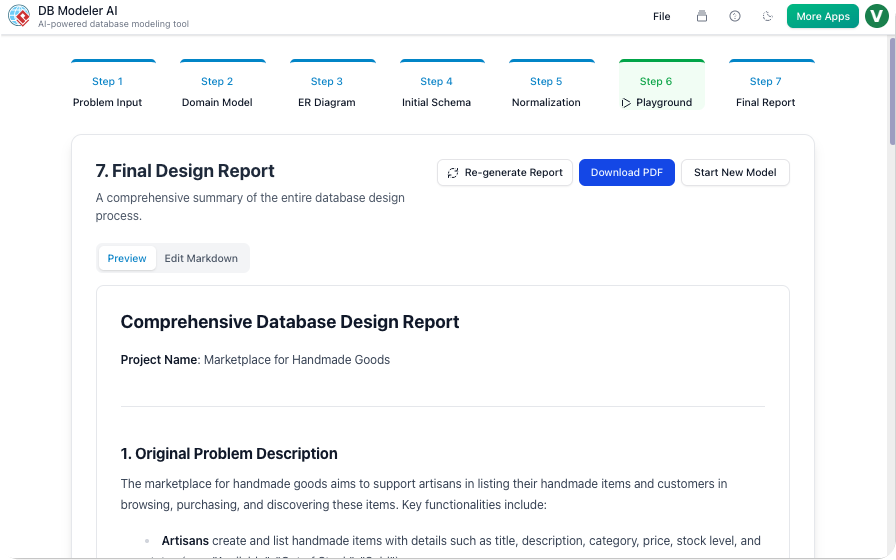
Finishing your design is just the beginning. To help you actually build your application, DBModeler AI generates a comprehensive AI Summary Report. Think of it as a custom “instruction manual” for your specific database.
DB Modeler AI guides you through the complete database design lifecycle, transforming a simple description into a fully normalized, testable SQL schema in minutes.
The process begins by clearly establishing the project’s scope.
Action: Enter a Project Name and a detailed Problem Description (e.g., “A system for managing university courses, students, and enrollments”). You can write it yourself or let the AI instantly generate a description based on a brief prompt.
Goal: Provide the necessary context for the AI to understand the core entities, rules, and relationships of your business domain.
The AI translates your text into a visual, high-level blueprint.
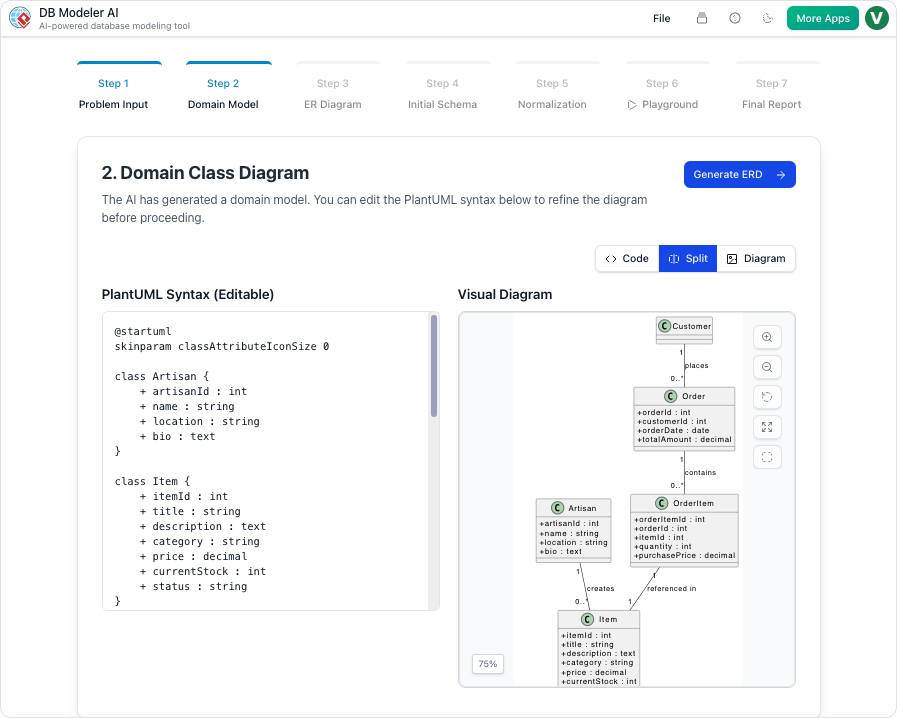
Action: The AI generates a Domain Model Diagram (conceptual model) rendered via PlantUML syntax.
Refinement: You retain full control. The PlantUML syntax is fully editable, allowing you to refine class names, attributes, and relationships using simple text commands.
This step maps the conceptual model to a database structure.
Action: The tool converts the refined Domain Model into an Entity-Relationship Diagram (ERD), automatically identifying and defining essential database components like Primary Keys (PKs), Foreign Keys (FKs), and cardinality (1:1, 1:N, N:M).
Refinement: Just like before, you can edit the ERD’s PlantUML syntax to enforce specific key structures or adjust relationships to perfectly match your database strategy.
The visual design is converted into executable code.
Action: The tool generates the complete, ready-to-use PostgreSQL SQL Data Definition Language (DDL), including all Create Table statements, columns, and constraints, derived directly from the ER Diagram.
Goal: Provide a functional, deployable schema based on your visual design.
The AI automatically optimizes your schema for integrity and efficiency.
Action: The tool iteratively applies the rules of normalization, progressing the schema from its initial state to First (1NF), Second (2NF), and finally, Third Normal Form (3NF).
Goal: Eliminate data redundancy, prevent update anomalies, and ensure data integrity. You can inspect the schema at each stage to understand the optimization process. The AI also generates sample data (INSERTs) and DML scripts for the next step.
Validate your design in a live, controlled environment.
Action: Launch a live, in-browser database instance based on your chosen schema (Initial, 1NF, 2NF, or 3NF).
Testing: Use the AI to generate sample records quickly (e.g., “Add 10 records”) or manually insert/filter data. Run custom SQL queries to test functionality and performance against realistic data.
Goal: Verify that your final schema is robust and performs as expected before you deploy it to a production environment.
The entire design process is summarized and ready for hand-off.
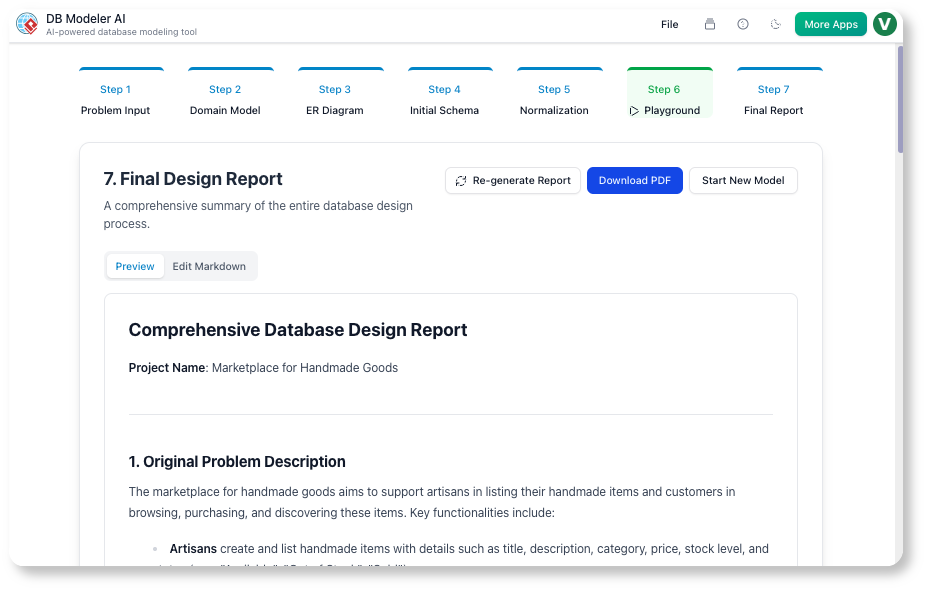
Action: The tool compiles a comprehensive Final Design Report in Markdown format, summarizing all key artifacts: the problem, the diagrams, the final 3NF schema, and sample DML scripts.
Refinement: You can directly edit the Markdown of the report to add specific project notes, implementation details, or custom documentation for your team.
Goal: Create a professional, maintainable, and editable document for project archiving and developer hand-off.
Generate and customize clear, professional domain and ER diagrams that reflect your project’s structure.
Improve your schema quality with explanations that walk you through the normalization process from 1NF to 3NF.
Run real queries and test your design immediately, with no software installation or setup required.
Not at all! We designed DBModeler AI specifically to bridge the gap between a business idea and technical code. Our 7-step guided journey walks you through the entire process in plain English. The AI acts as your personal consultant, handling the complex "normalization" and technical rules so you can focus on how your business should work.
Think of the Playground as a "test drive." Once the AI generates your database design, we set up a temporary, private sandbox for you. You can click buttons to add, edit, or view data just like a real app would. This lets you see if your design actually works for your needs before you spend any time or money on actual development.
Yes! At the end of the process, DBModeler AI gives you production-ready SQL code (DDL). This is the universal language that almost every major database (like MySQL, PostgreSQL, or SQL Server) understands. You also get an AI-Generated Summary Report, which serves as a blueprint for your developers to follow.
Turn your ideas into production-ready database schemas effortlessly. Start designing today and experience intuitive database modeling that keeps you in control.
