 Visual Paradigm Desktop |
  Visual Paradigm Online
AI-Powered Image Text Translation
The Show/Hide Text Block Borders feature gives you the flexibility to control how text appears within your translated image. By default, the translated text blocks in your image don’t show any borders, ensuring a clean and seamless design. However, for those who prefer to visualize and adjust the placement of text more precisely, the option to show text block borders can be incredibly useful.
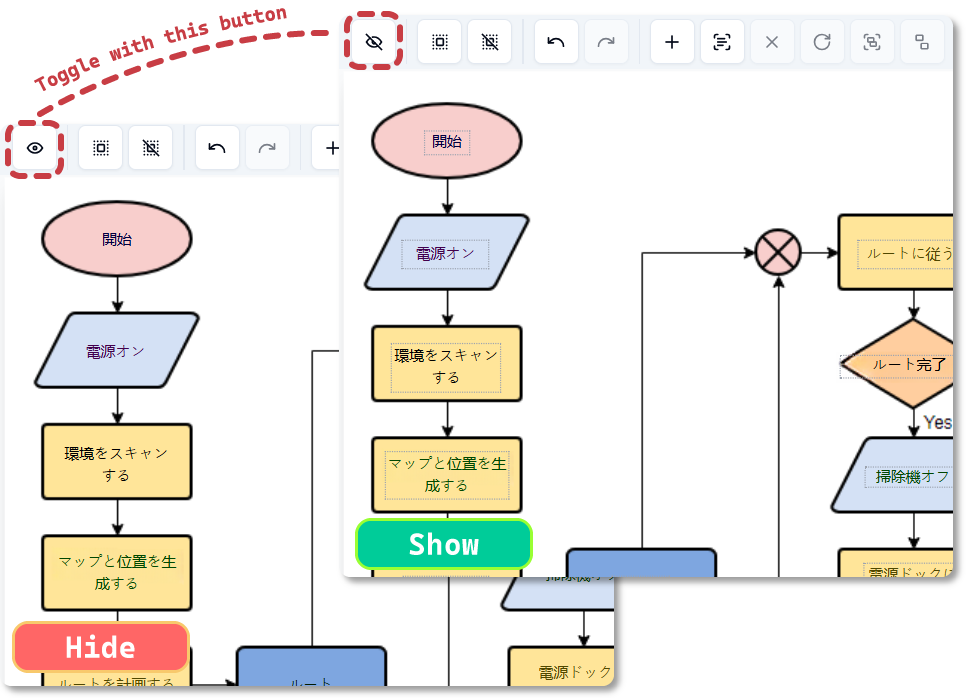
Controlling the visibility of text block borders is an essential tool for ensuring a smooth and accurate design process. Here’s why this feature is beneficial:
The Show/Hide Text Block Borders feature allows you to work more efficiently, enabling you to see and manage the structure of your text without compromising the look of your final design.
The Show/Hide Text Block Borders feature is particularly useful in the following scenarios:
Start by uploading the image you want to translate and edit.
To toggle the visibility of the borders of the translated text (blocks), simply click the “Show Text Blocks Bounds” option in the toolbar. When enabled, you’ll see the borders of each text block on your image. This makes it easy to move, resize, and align the text with precision.
With the borders visible, you can adjust and move your text blocks to fit your image layout perfectly. When you’re finished, you can hide the borders again for a cleaner final view.
Once you’ve made your adjustments, preview your image to make sure everything looks as intended.
The ability to toggle text block borders gives you better control and flexibility while editing your image. Here’s why this feature is crucial for your design workflow:
Experience the ease of translating text in images with our cutting-edge AI technology. Start using this Beta feature now and see how it transforms the way you communicate across languages.
