TEAM KNOWLEDGE HUB

Visual Paradigm NotesKeep

The team-centric platform that turns scattered documents, text notes, and design assets into an organized, single source of truth. Connect your knowledge base with our companion AI Chatbot to instantly generate diagrams and track project changes over time.

Why We Built the NotesKeep

A Living Narrative for Dynamic Projects

Traditional wikis and documents become outdated the moment a project shifts. We built NotesKeep to tear down knowledge silos and fix the core documentation problems fast-moving teams face every day:
  • Centralized Place for Project Knowledge and Insights

    Stop copying and pasting text. Instantly bring multi-format external files into one unified workspace as fully editable team notes.

  • Temporal Continuity

    Capture the real timeline of your project. Track daily requirement updates so you always know what the active plan is right now.

  • Turn Project Notes into Instant AI Intelligence

    Transform raw meeting notes, updates, and project docs into an active knowledge base. Your AI Chatbot instantly references your saved insights to answer project questions, track decisions, and keep your work moving forward.

How NotesKeep Empowers Your Team

A core part of your team’s workspace for design, documentation, and strategy.
CORE FOCUS 01

Your Project Knowledge, No Matter the Source

Never worry about file types or fragmented information. Import your team’s existing documents, sheets, slides, and web links directly into NotesKeep—creating a unified, searchable workspace on the spot.

  • Documents & Text: Word (.docx), PDF (up to 10 pages), Markdown (.md), HTML, and Plain Text (.txt).

  • Spreadsheets & Data: Excel (.xlsx, .xls) and CSV files.

  • Presentations: PowerPoint (.pptx) files.

  • Save Web Pages Instantly: Simply paste a website link (URL) to grab the content and turn it into a clean, editable note inside your workspace.
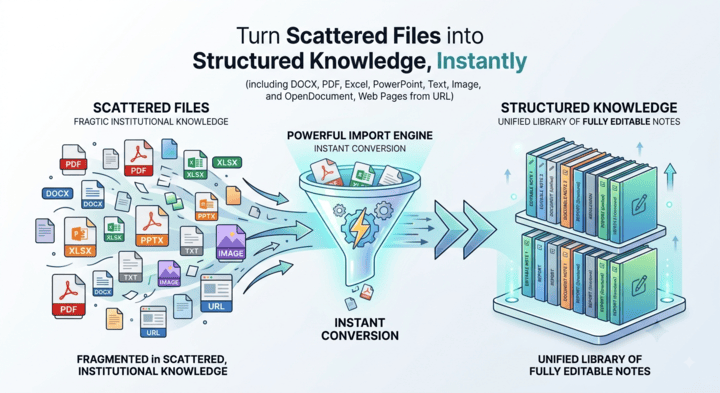
An infographic for NotesKeep - Visual Paradigm demonstrating how the powerful import engine instantly converts scattered, fragmented files into a unified library of fully editable notes.
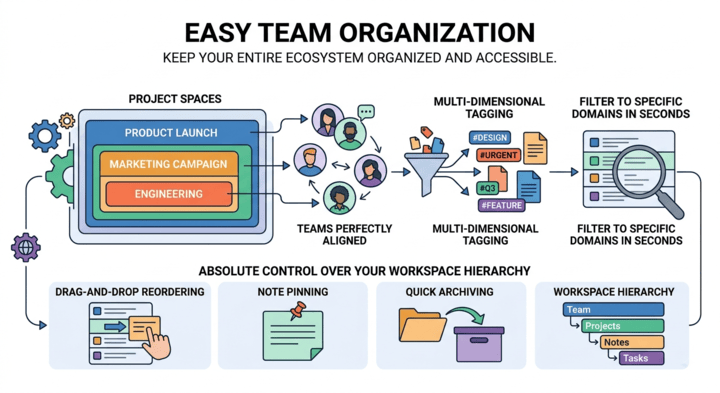
A diagram illustrating easy team organization in NotesKeep - Visual Paradigm, featuring project spaces, multi-dimensional tagging, search filters, drag-and-drop reordering, and note pinning for absolute control over workspace hierarchy.
CORE FOCUS 02

Organize Your Notes with Projects and Tags

Keep your documentation organized and easy to find. Group your notes into clear project spaces so everyone knows where to look. Use simple tags to filter down to specific topics in seconds. With quick drag-and-drop reordering, note pinning for high-priority items, and a simple archive for old records, managing your workspace is completely effortless.
CORE FOCUS 03

Embed Live Diagrams Directly Into Your Notes

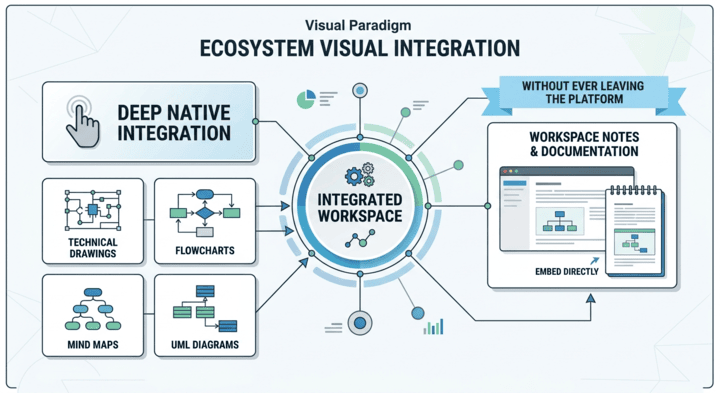
Bring your words and visual designs together in one place. Because NotesKeep connects directly with the rest of Visual Paradigm, you can drop your flowcharts, mind maps, UML diagrams, and system layouts directly into your team notes without ever leaving the page.
A visual graphic showcasing the ecosystem visual integration of NotesKeep - Visual Paradigm, demonstrating how technical drawings, flowcharts, mind maps, and UML diagrams embed directly into workspace notes without leaving the platform.
Your Notes, Now Smarter

Ask Anything, Backed by Your Project Notes

Stop wasting time searching through pages of docs or asking teammates for updates. The companion AI Chatbot reads across your entire NotesKeep workspace to answer questions, synthesize information, and recall crucial details in seconds—always grounded in your team’s actual project notes.

Ask AI to Find Answers from Your Notes

Supercharge your documentation by pairing NotesKeep with the companion Visual Paradigm AI Diagramming Chatbot. The chatbot leverages specialized training in visual modeling to instantly read your unstructured project notes and transform them into professional software engineering and business diagrams (such as UML, ERD, DFD, C4 models, BPMN, and flowcharts).
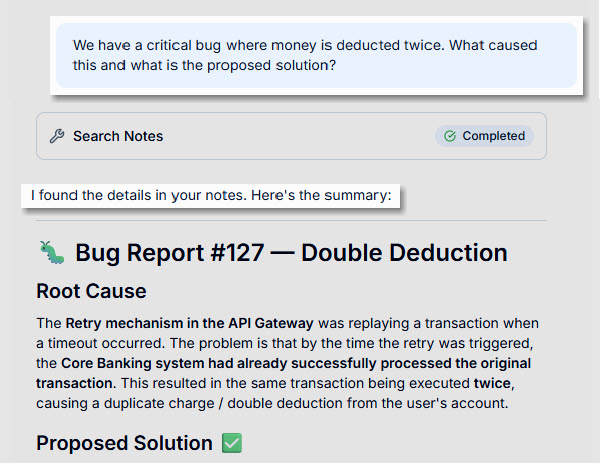
An interface mockup of the AI companion chatbot tool analyzing a project workspace in NotesKeep - Visual Paradigm, successfully answering a complex user query about a critical double deduction bug report.
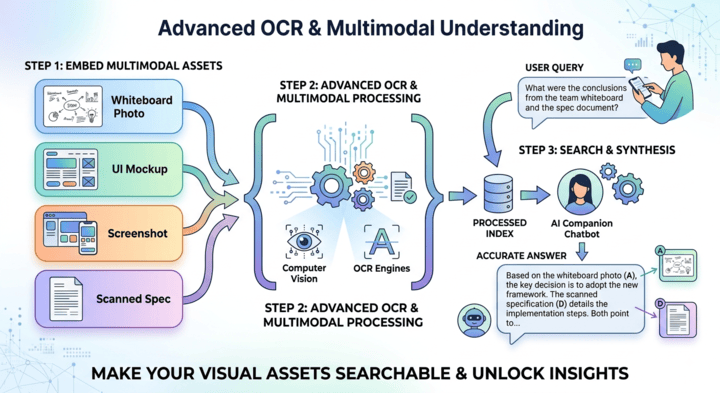
Advanced OCR & Multimodal Understanding​

Advanced OCR & Multimodal Understanding

Make your visual assets searchable. When you embed whiteboard photos, UI mockups, screenshots, or scanned specs into your notes, our advanced computer vision and OCR engines automatically process them. When you query the AI companion chatbot, it synthesizes both the written text and the text locked inside your images to deliver completely accurate answers.

FAQ

No. While it features a comprehensive text editor for custom formatting (bold text, lists, tables, links, and code blocks), it is a comprehensive team platform featuring multi-format file conversion, deep visual diagram embedding, and timeline-aware AI features.
Yes! When you upload Word documents, spreadsheets, PDFs, or presentations, NotesKeep converts them into text that you can edit directly inside your workspace.
The companion AI Diagramming Chatbot allows you to bound your natural language queries to specific context windows—such as a single project, a specific tag, or a subset of notes—ensuring highly targeted, accurate results.

Simple, Straightforward Access

NotesKeep and its AI features are premium tools included directly in our paid plans. We do not offer free versions or trial periods.

NotesKeep Core Access

Gain full access to the core NotesKeep platform for creating, importing, and organizing notes.

VP Online

Requires Combo Edition or higher.

VP Desktop

Requires Professional Edition or higher with active maintenance (includes complimentary VP Online Combo access).

Visual Paradigm AI Chatbot

Unlock the integrated AI note taker for scoped queries, diagram generation, and multimodal analysis.

VP Online

Requires Deluxe Edition or higher.


VP Desktop

Requires Professional Edition or higher with active maintenance.

Loading

Signing-in 3 seconds...

Signing-up 3 seconds...