 Visual Paradigm Desktop |
  Visual Paradigm Online
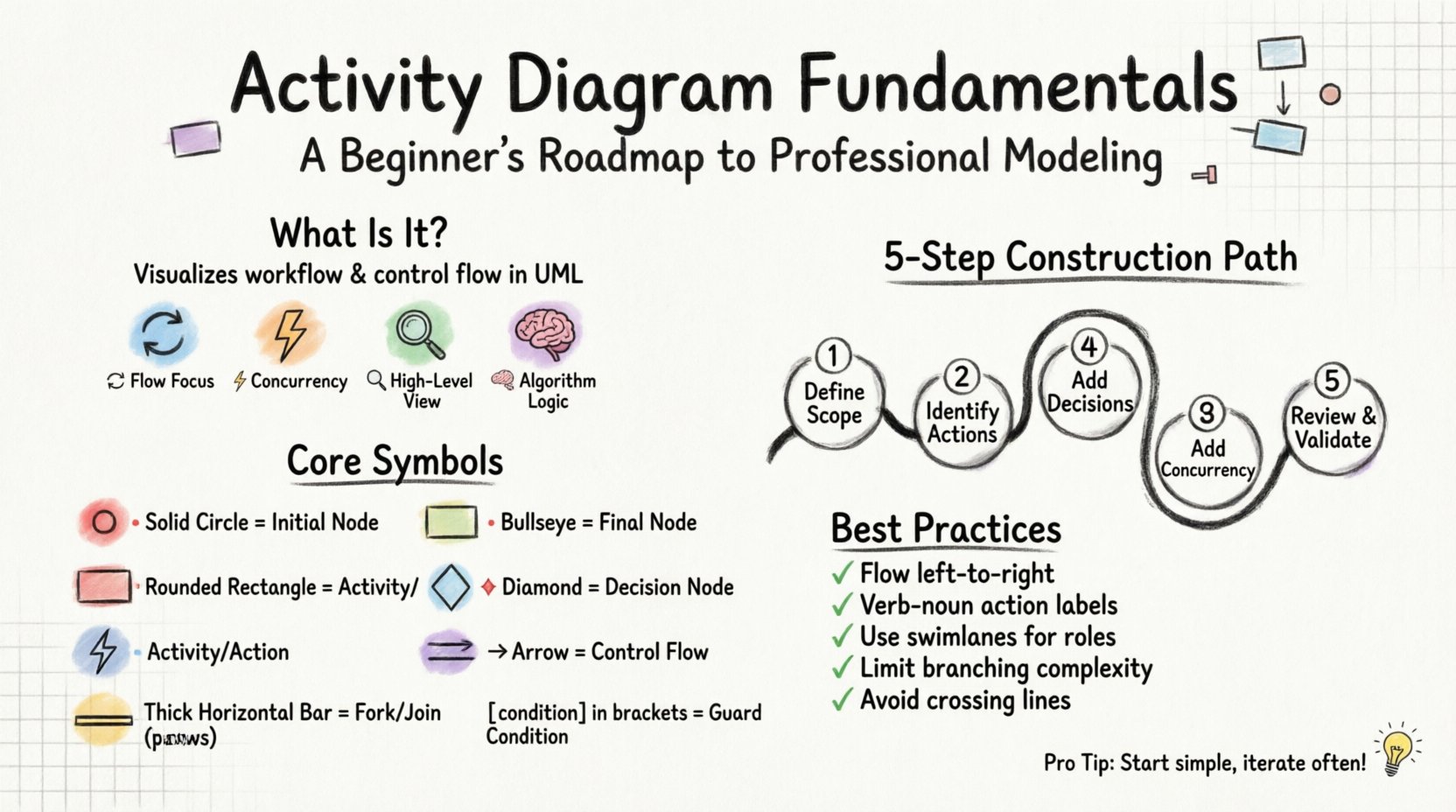
Understanding complex workflows is essential for any system architect, business analyst, or software developer. Visual representations bridge the gap between abstract logic and tangible implementation. Among the Unified Modeling Language (UML) suite, the activity diagram stands out as a powerful tool for describing the dynamic aspects of a system. This guide explores activity diagram fundamentals, providing a clear path from basic concepts to professional-level modeling.
Whether you are mapping out a business process or designing the logic behind a software algorithm, the ability to visualize flow is critical. This document serves as a comprehensive resource. It covers symbols, construction techniques, and best practices without relying on specific tools. The focus remains on the underlying principles of modeling.
An activity diagram is a behavioral diagram that shows the flow of control and data. It is often used to model the workflow of a system. Unlike sequence diagrams, which focus on interactions between objects over time, activity diagrams focus on the steps within a process. They are akin to flowcharts but follow UML standards.
Key characteristics include:
When used correctly, these diagrams reduce ambiguity. They help stakeholders understand the sequence of events before a single line of code is written. This early visualization saves time during the development phase.
To create a professional model, one must understand the standard symbols. Each shape carries a specific meaning regarding the flow of control. Using the correct notation ensures that the diagram is readable by anyone familiar with UML.
The building blocks of an activity diagram are nodes. These represent points where the flow changes direction or pauses.
| Symbol Name | Visual Representation | Function |
|---|---|---|
| Initial Node | 🔴 Solid Circle | Represents the starting point of the activity. There should be only one per diagram. |
| Final Node | 🏁 Double Circle (Bullseye) | Represents the successful termination of the activity. |
| Activity Node | 🟧 Rounded Rectangle | Represents a step or action. It can be a simple task or a complex sub-process. |
| Decision Node | 🔶 Diamond | Directs the flow based on a condition. It has one incoming edge and multiple outgoing edges. |
| Fork Node | ⚡ Thick Bar | Splits the flow into parallel concurrent activities. |
| Join Node | ⚡ Thick Bar | Merges parallel flows back into a single sequence. All incoming edges must be active. |
Edges connect the nodes. They define the order of execution. By default, the flow moves from the top to the bottom and left to right, though this can vary based on layout.
[is_approved]). This specifies the condition required for the flow to pass.Creating a model requires a structured approach. Rushing into drawing nodes without a plan often leads to cluttered and confusing diagrams. Follow this logical sequence to ensure clarity.
Identify the start and end points of the process. What triggers the activity? What constitutes completion? For example, in an e-commerce context, the start might be “Customer Clicks Buy” and the end might be “Order Confirmed”.
List the high-level steps. Do not worry about details yet. Write down the primary activities that must occur. This creates a skeleton for the diagram.
Where does the path diverge? Consider error handling, user choices, or system checks. Every time a “Yes” or “No” decision is made, a diamond node is required.
Are there tasks that happen at the same time? Use fork and join nodes to represent parallelism. For instance, while the system sends an email, it can simultaneously update the database.
Trace the paths from start to finish. Ensure every branch leads to a final node. Check for dead ends where the flow stops unexpectedly.
Once the basics are understood, more sophisticated patterns can be applied. These techniques add depth to the model and clarify complex scenarios.
Swimlanes organize activities by responsibility. This is crucial in large systems where multiple actors or departments are involved.
Using swimlanes makes it immediately clear who is responsible for each step. It highlights handoffs between different teams. A handoff often indicates a potential point of failure or delay in the process.
Real-world processes rarely go perfectly. Activity diagrams should account for failures.
Data flows between actions. Object nodes represent the data itself. Pins are the specific entry or exit points on an action node where data is consumed or produced.
For example, an action “Calculate Tax” might have an input pin for “Subtotal” and an output pin for “Tax Amount”. Connecting these pins to action nodes clarifies how data transforms as it moves through the system.
A diagram is only useful if it can be read. Adhering to established guidelines ensures the model remains maintainable and understandable.
Even experienced modelers make mistakes. Being aware of common errors helps improve the quality of the documentation.
| Pitfall | Why It Is Problematic | Solution |
|---|---|---|
| Dangling Paths | Flow reaches a point with no exit. | Ensure every branch leads to a Final Node or loops back. |
| Missing Conditions | Decision nodes lack guard conditions. | Label every outgoing edge with a condition or default path. |
| Over-Complexity | Trying to model the entire system in one view. | Break the system into manageable sub-processes. |
| Inconsistent Symbols | Using non-standard shapes for standard nodes. | Stick strictly to UML notation for symbols. |
| Ignoring Concurrency | Forcing parallel tasks into a linear sequence. | Use Fork and Join nodes to show simultaneous execution. |
Activity diagrams do not exist in isolation. They work best when integrated with other parts of the UML suite.
While activity diagrams show the flow of logic, sequence diagrams show the interaction between objects. You can use an activity diagram to define the overall process, then use sequence diagrams to detail the specific interactions within a single activity node.
State machines focus on the states of a single object. Activity diagrams focus on the actions of the system. Use state machines for objects that have distinct lifecycle states (e.g., an Order changing from “Pending” to “Shipped”). Use activity diagrams for the workflow that moves the order between those states.
Use case diagrams provide a high-level view of functionality. An activity diagram is often the detailed view of a single use case. It explains *how* the use case is achieved internally.
The utility of activity diagrams extends across various industries. They are not limited to software development.
Organizations use these diagrams to optimize workflows. By visualizing steps, bottlenecks become visible. For example, a manufacturing line might show a delay at the “Quality Check” node, prompting a review of that specific step.
Programmers use activity diagrams to plan logic before coding. This is particularly useful for complex algorithms involving loops and nested conditions. It serves as a blueprint for the code structure.
Architects use them to define how different subsystems communicate. They clarify data handoffs and integration points between microservices or legacy systems.
Modeling is an iterative process. The first draft is rarely the final version. As requirements change, the diagram must evolve.
Building effective activity diagrams requires a balance of technical precision and clear communication. By adhering to standard symbols and focusing on logical flow, you create a document that serves as a reliable reference.
Remember the following points for success:
With practice, creating these models becomes intuitive. They become a natural extension of your thinking process, helping to translate abstract ideas into structured, actionable plans. This discipline elevates the quality of your system design and ensures that all stakeholders share a common understanding of the workflow.
