 Visual Paradigm Desktop |
  Visual Paradigm Online
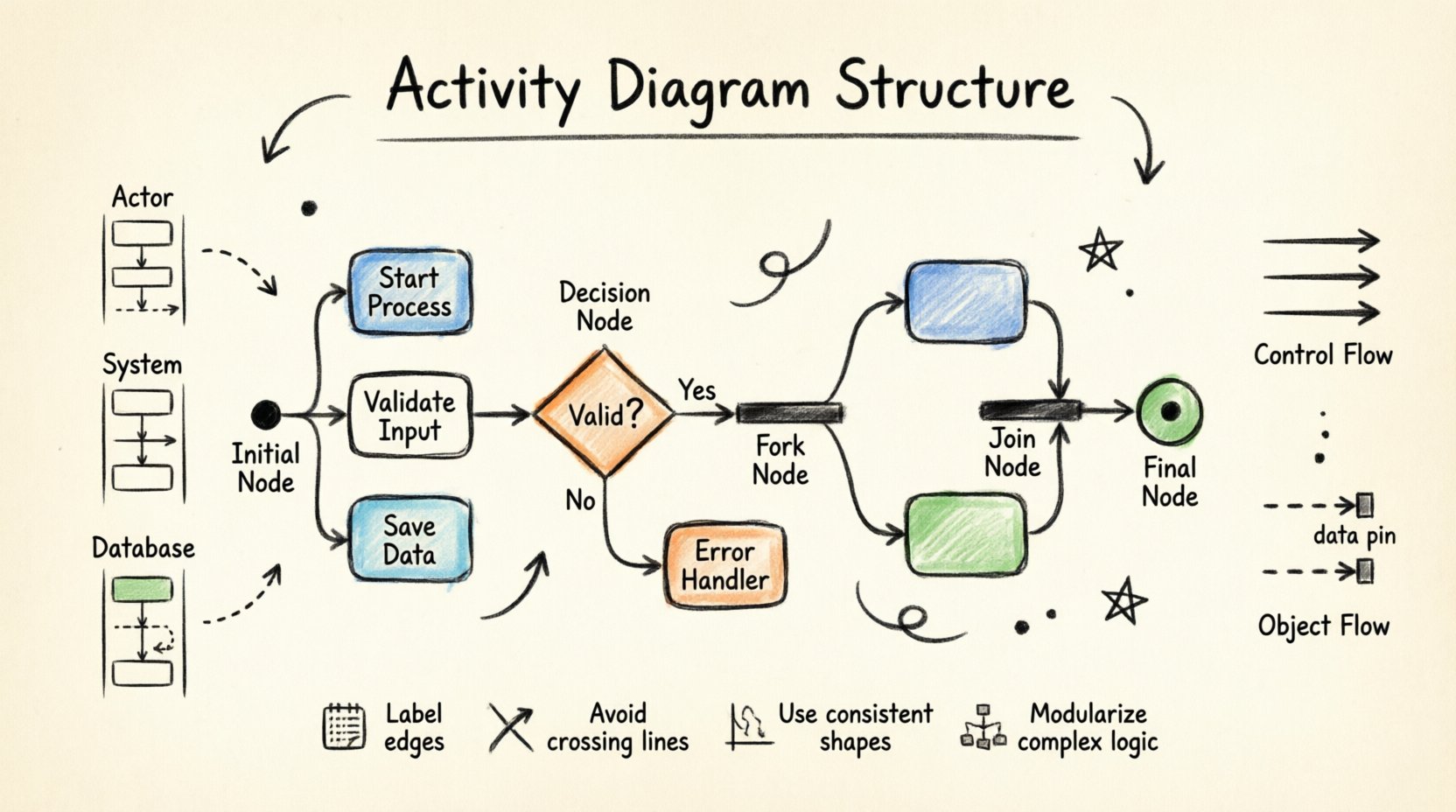
When modeling complex systems, clarity is paramount. An activity diagram serves as a dynamic representation of the workflow within a system. It captures the sequence of actions, the flow of control, and the interactions between different components. This guide explores the structural elements that define a robust activity diagram. We will examine the specific nodes, connectors, and organizational patterns that ensure the model remains readable and functional. Understanding these mechanics is essential for anyone involved in system design or process analysis.
Every activity diagram is constructed from a set of standardized symbols. These symbols represent specific states or actions within the workflow. By combining them in logical sequences, you create a narrative of how the system behaves over time. Below, we break down the fundamental nodes that appear in almost every diagram.
Each node type serves a distinct purpose. Using them correctly prevents ambiguity. For instance, confusing a decision node with a merge node can lead to logic errors in the model. A decision node introduces a choice. A merge node combines paths that have already been chosen. Keeping this distinction clear is vital for accurate logic visualization.
Complex systems often involve multiple actors or subsystems. Swimlanes provide a visual way to partition the diagram. They assign specific activities to specific owners. This helps stakeholders understand who is responsible for which part of the process. Swimlanes can be arranged vertically or horizontally.
When an activity crosses from one lane to another, it indicates a handoff. This is where communication or data transfer occurs between different responsibilities. Maintaining clean boundaries between lanes reduces cognitive load for the reader.
| Orientation | Best Use Case | Visual Flow Direction |
|---|---|---|
| Vertical | Multiple actors performing sequential steps | Top to Bottom |
| Horizontal | Process stages moving across a timeline | Left to Right |
Nodes are meaningless without connections. Edges define the order of operations. There are two primary types of flows used in activity diagrams: control flow and object flow.
Control flow represents the sequence of execution. It dictates which activity happens next. The arrow points from the source node to the target node. This is the most common type of connection in a diagram. It ensures that the logic moves from the start to the end without skipping steps.
Object flow represents the movement of data or artifacts. While control flow moves the process, object flow moves the information required to complete the process. These are often drawn as dashed lines or distinct line styles depending on the notation standard.
Distinguishing between these flows helps clarify whether an edge represents a trigger or a transfer of data. In complex models, mixing them without clear labeling can confuse the reader.
For large-scale systems, a simple list of nodes becomes unwieldy. Advanced elements help manage complexity by grouping related activities. This keeps the high-level view clean while allowing for detail when needed.
A subgraph allows you to encapsulate a portion of the activity diagram. It acts like a single activity node that expands into a detailed view. This is useful for hiding complexity. You can focus on the high-level flow in the main diagram and drill down into specific subgraphs for detailed logic.
Real-world processes rarely go perfectly. Activity diagrams should account for errors. This is often done using exception nodes or specific paths that lead to recovery activities. If a step fails, the flow diverts to a handler rather than stopping abruptly.
Creating a diagram is not just about drawing shapes. It is about communicating intent. A well-structured diagram reduces the time required for team members to understand the process. Poor structure leads to misinterpretation and errors in implementation.
Use the same shapes for the same types of actions throughout the document. Do not use a rounded rectangle for one activity and a diamond for another if they represent similar steps. Consistency allows the reader to scan the diagram quickly and understand the meaning of each symbol immediately.
Spaghetti logic occurs when the flow becomes too tangled to follow. This happens when there are too many decision nodes or when the diagram tries to do too much at once. To avoid this:
Activity diagrams are versatile. They are used in various stages of development and analysis. Understanding where to apply them maximizes their value.
During the early phases, activity diagrams help capture user workflows. They translate business requirements into visual steps. This ensures that developers understand the user’s intent before writing code.
Designers use these diagrams to define the logic of internal components. They help identify bottlenecks or unnecessary steps in the system architecture. This leads to more efficient implementations.
Testers use the diagrams to derive test cases. Each path through the diagram can represent a specific test scenario. This ensures that all logical branches are covered during the verification phase.
Even experienced modelers make mistakes. Being aware of common errors helps you maintain high quality.
Activity diagrams do not exist in isolation. They work best when integrated with other modeling notations. This provides a complete picture of the system.
Activity diagrams often interact with class diagrams. The activity nodes may invoke operations defined on classes. The object flows may represent instances of classes. This linkage ensures that the logic matches the data structure.
While activity diagrams focus on workflow, state machine diagrams focus on object states. They can complement each other. An activity diagram can show the sequence of events that trigger state changes. A state machine diagram can show the valid states of an object during that sequence.
To conclude this walkthrough, here is a quick reference for the main components discussed.
| Component | Shape | Purpose |
|---|---|---|
| Initial Node | Black Circle | Start point of workflow |
| Activity | Rounded Rectangle | Represents a task or action |
| Decision | Diamond | Branching logic based on conditions |
| Fork/Join | Thick Bar | Parallel execution and synchronization |
| Final Node | Double Circle | End point of workflow |
Mastering the structure of these diagrams allows for precise communication of system logic. By adhering to the standards and principles outlined here, you ensure that your models are robust, clear, and effective tools for your team.
As you begin creating your own diagrams, start small. Map out a simple process first. Once you are comfortable with the basic nodes, introduce swimlanes and parallel flows. Practice identifying the control flow and object flow in existing documentation. Over time, the structure becomes intuitive, allowing you to focus on the logic rather than the symbols.
Remember that the goal is understanding. If a diagram cannot be understood by a peer without explanation, it needs refinement. Use the tools and techniques discussed to build clarity. Your models are the blueprint for the system, and a solid structure ensures a solid foundation.
