 Visual Paradigm Desktop |
  Visual Paradigm Online
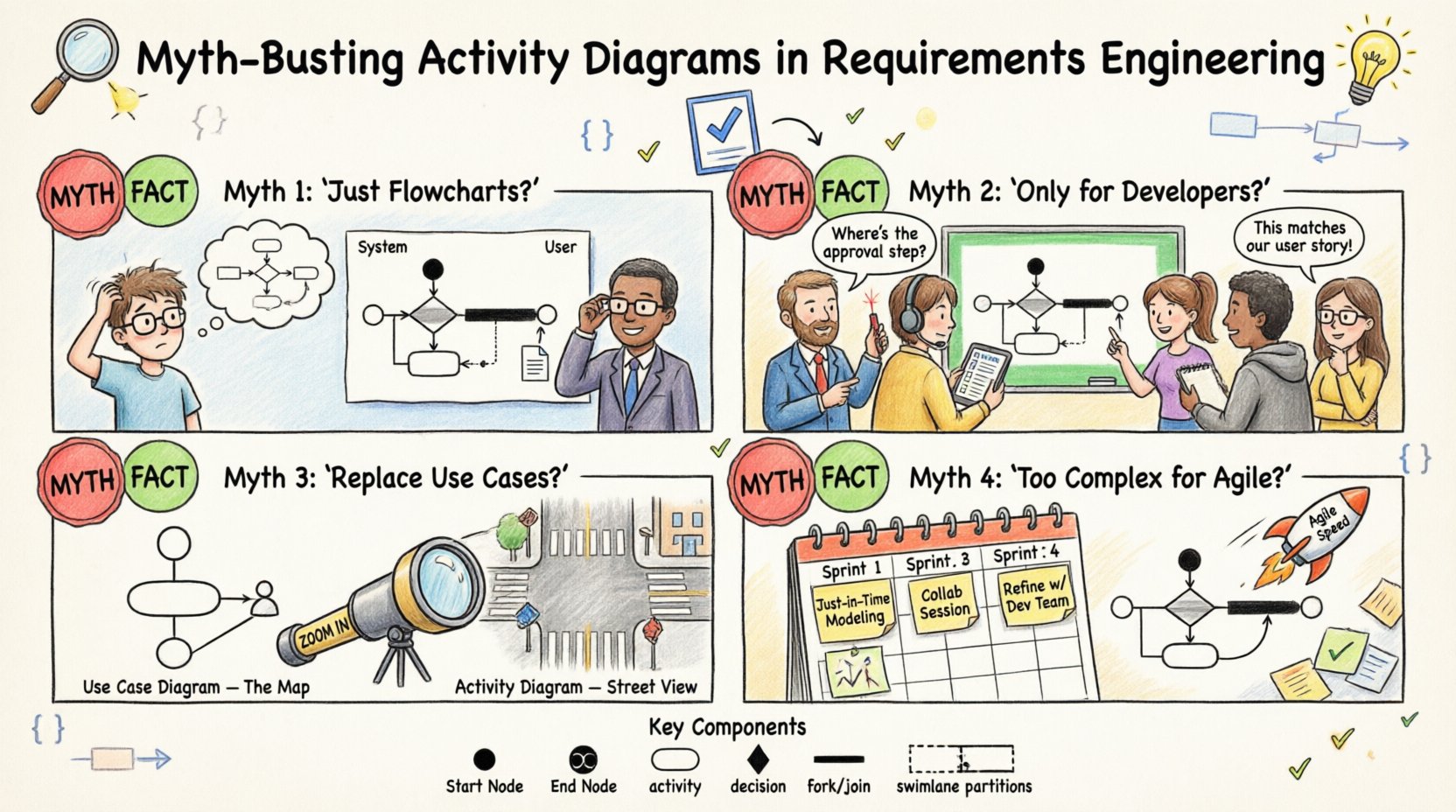
Requirements engineering serves as the backbone of any successful software development lifecycle. It defines what a system must do before a single line of code is written. Within this discipline, visual modeling tools are indispensable for communicating complex behaviors to diverse stakeholders. Among these tools, the activity diagram stands out as a powerful mechanism for describing the flow of control and data within a system. However, despite its utility, the activity diagram is frequently misunderstood. Misconceptions often lead to its misuse, resulting in documentation that is either too detailed or too abstract.
This guide aims to clarify the role of activity diagrams in requirements engineering. We will dismantle common myths, explore technical components, and outline best practices for creating effective models. By understanding the true nature of these diagrams, analysts and developers can ensure that the requirements captured are accurate, testable, and aligned with business goals. Let us separate fact from fiction to build a stronger foundation for system design. 📊
An activity diagram is a behavioral diagram defined within the Unified Modeling Language (UML) standard. It describes the flow of activities from one state to another. While it shares visual similarities with flowcharts, it possesses distinct semantic meanings that make it suitable for complex system modeling. In the context of requirements engineering, these diagrams help visualize workflows, business processes, and the logic governing system behavior.
The primary purpose is not to dictate implementation details but to capture the “how” of a system. It complements use case diagrams, which capture the “what.” When used correctly, an activity diagram provides a clear roadmap of interactions between actors, objects, and internal processes. This clarity reduces ambiguity during the development phase.
This is perhaps the most pervasive misconception. Many practitioners treat activity diagrams as modern flowcharts, using them solely to map logical decisions. While flowcharts focus on the flow of control through a program, activity diagrams encompass a broader scope.
Key differences include:
Confusing the two can lead to models that fail to capture the parallel nature of modern computing systems. For example, a banking transaction involves checking a balance, deducting funds, and logging the transaction. A flowchart might sequence these strictly. An activity diagram can show the logging and the deduction happening concurrently.
| Feature | Flowchart | Activity Diagram |
|---|---|---|
| Primary Focus | Logical decision flow | Workflow and concurrency |
| Concurrency | Not supported | Supported via Fork/Join |
| Object Handling | Minimal | Tracks object flow explicitly |
| Responsibility | Not explicit | Defined via Swimlanes |
| UML Standard | General purpose | Part of UML Behavioral Diagrams |
There is a belief that detailed technical diagrams belong exclusively in the hands of engineering teams. This limits the value of the diagram as a communication tool. In requirements engineering, the audience includes business analysts, project managers, and domain experts.
Activity diagrams serve as a lingua franca for these groups. They translate abstract business rules into visual logic that non-technical stakeholders can verify. If a stakeholder cannot understand the process flow, the requirements are likely flawed.
By restricting the diagram to developers, organizations lose a vital feedback loop. The diagram should be readable by anyone involved in the project lifecycle, provided the notation is explained.
Some teams attempt to use activity diagrams as a standalone replacement for use case diagrams. This is a fundamental error. They serve different purposes.
Using an activity diagram for everything creates a massive, tangled web of logic that is difficult to navigate. Use case diagrams provide the macro view. Activity diagrams provide the micro view for specific scenarios. Both are required for a comprehensive requirements specification.
In fast-paced environments, documentation is often viewed as a bottleneck. Some argue that detailed activity diagrams are incompatible with Agile methodologies. This ignores the flexibility of the modeling technique.
Activity diagrams do not require exhaustive upfront design. They can be created just-in-time. Teams can model the current iteration’s user stories without worrying about the entire system architecture. This approach supports Agile principles by keeping documentation lean and relevant.
Benefits in an Agile context include:
The key is to avoid over-modeling. Focus on the active flows needed for the current sprint rather than creating a perfect map of the entire system.
To use these diagrams effectively, one must understand the standard symbols and their meanings. The UML standard defines specific nodes that represent different aspects of the workflow.
Every activity diagram starts with an Initial Node, represented by a solid black circle. This indicates where the process begins. It has exactly one outgoing edge. The process ends at a Final Node, represented by a solid black circle inside a larger ring (bullseye). A diagram may have multiple final nodes, such as success and error states.
Activities represent the work being performed. They are depicted as rounded rectangles. Each activity consumes input objects and produces output objects. The duration of an activity can be specified, though in requirements engineering, it is often treated as instantaneous unless timing is a specific constraint.
Logic is handled through diamond-shaped Decision Nodes. These represent a single point of control flow where multiple paths are possible. Each outgoing edge must have a guard condition (e.g., [balance > 0]). A Merge Node brings multiple incoming paths back together without changing the flow logic.
Concurrency is managed using Fork Nodes and Join Nodes. A fork node splits a single flow into multiple concurrent flows. These flows execute in parallel. A join node waits for all incoming flows to arrive before continuing the process. This is critical for modeling systems where multiple tasks happen simultaneously.
Swimlanes organize activities by responsibility. They can represent:
This visual separation clarifies who or what is responsible for each action. It helps identify bottlenecks and handoffs between different entities.
One of the most powerful features of activity diagrams is the ability to model parallel processing. In real-world systems, actions rarely happen in a strict sequence. Consider a purchase order system.
When a user submits an order:
A linear flowchart might say: Validate -> Check -> Log. However, checking inventory and logging can happen independently of payment validation. An activity diagram uses a fork node to split the flow after the order submission. One branch handles payment, another handles inventory. A join node waits for both to complete before moving to the confirmation stage.
Guard Conditions: These are boolean expressions attached to edges. They determine which path is taken. For example, an edge might be labeled [Valid Payment] or [Invalid Payment]. If the condition is false, the flow does not proceed. It is crucial to ensure that all outgoing paths from a decision node cover all possible outcomes to avoid deadlocks.
To avoid the pitfalls that lead to confusion, adhere to these guidelines when creating activity diagrams.
Even experienced modelers make mistakes. Being aware of common errors helps maintain the integrity of the requirements.
A deadlock occurs when a process waits indefinitely for an event that will never happen. In activity diagrams, this often happens when a join node waits for a flow that has already terminated at a different final node. Always ensure that all parallel paths merge correctly.
Uncontrolled loops can make a system hang. If a decision node always directs flow back to an earlier point without a termination condition, the process never ends. Ensure every loop has a clear exit path based on a guard condition.
If a decision node has multiple outgoing edges without guard conditions, the behavior is undefined. Every edge leaving a decision node must have a condition, or the conditions must sum to 100% of possibilities.
Attempting to model every edge case in the initial requirements phase leads to paralysis. Focus on the happy path and major error scenarios. Refine the details as the project progresses.
Activity diagrams do not exist in isolation. They work best when integrated with other modeling artifacts.
Validating requirements is an iterative process. Activity diagrams provide a visual check for logical consistency. They allow stakeholders to trace the path of a requirement from initiation to completion. By debunking the myths surrounding these diagrams, teams can leverage their full potential.
They are not just flowcharts for developers. They are not replacements for use cases. They are not too complex for Agile. They are flexible, robust tools for visualizing behavior. When constructed with care, they reduce risk, improve communication, and ensure that the final product meets the intended needs.
Invest time in learning the notation and the principles. Avoid common traps like deadlocks and ambiguity. Integrate them into your workflow alongside other modeling techniques. By doing so, you establish a solid foundation for system development that is clear, consistent, and effective.
Remember, the goal is clarity. If a diagram confuses the reader, it has failed its purpose. Use these tools to illuminate the path forward, ensuring that everyone involved understands the journey of the system from start to finish. 🏁
