 Visual Paradigm Desktop |
  Visual Paradigm Online
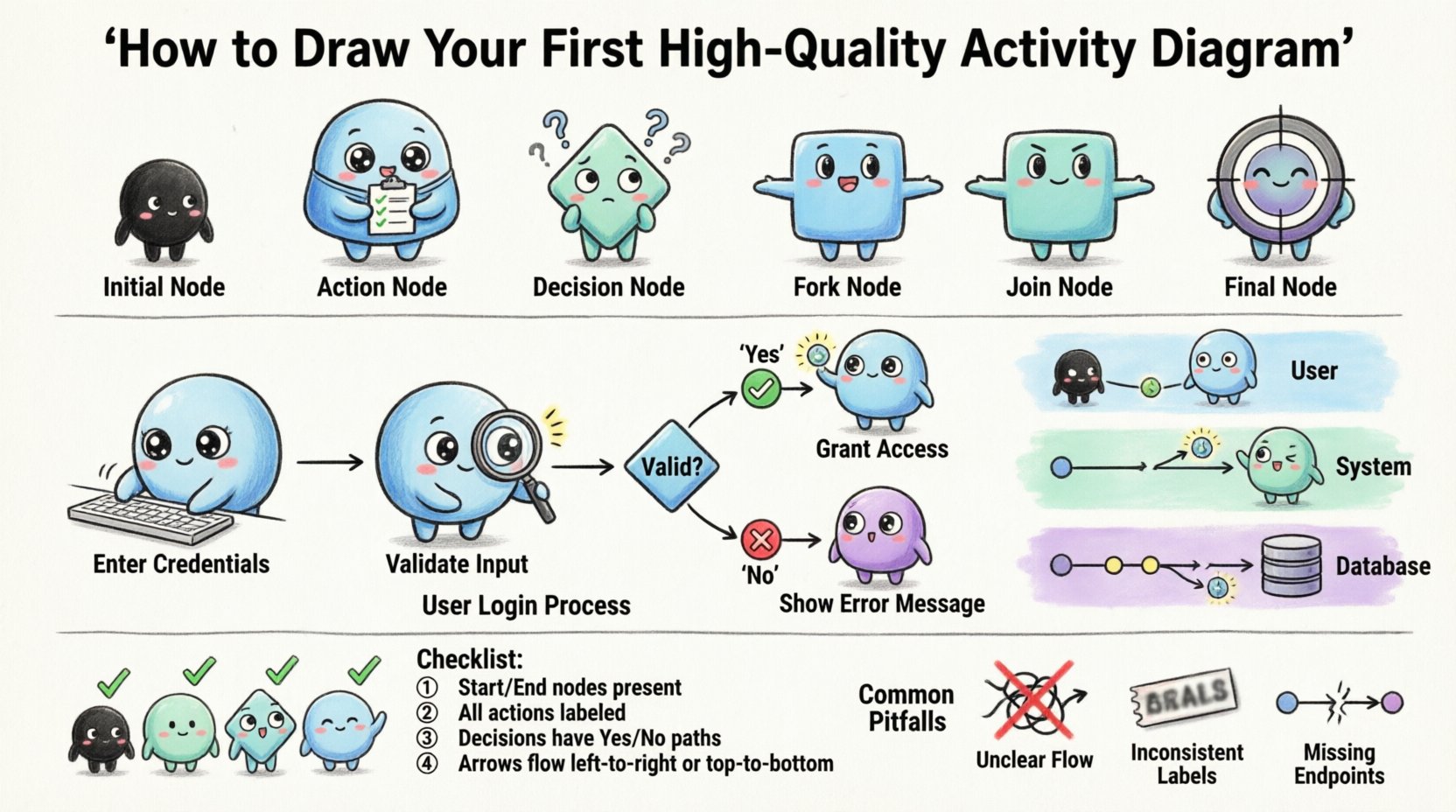
Creating a visual representation of a process is a fundamental skill for any analyst, developer, or system architect. When you need to describe the flow of logic within a system, an activity diagram provides the clearest path. Unlike static structure diagrams, activity diagrams focus on behavior and dynamic movement. They map out the sequence of actions, decisions, and flows that occur from start to finish. Many people find these diagrams confusing initially because the symbols can seem abstract. This guide breaks down the process into manageable steps, ensuring you can build accurate models without unnecessary stress.
Activity diagrams are often compared to flowcharts, but they have distinct capabilities within the Unified Modeling Language (UML) framework. They are designed to model the workflow of a system, showing how data and control move through different parts of a process. Here are the primary reasons to use them:
By visualizing the workflow, you reduce the risk of overlooking edge cases. This is particularly useful for business process modeling and software system design. It bridges the gap between abstract requirements and concrete implementation details.
Before drawing, you must understand the building blocks. Every diagram relies on a set of standard symbols. Understanding what each shape represents is the first step toward clarity.
Every activity diagram begins with a solid black circle. This represents the starting point of the process. There should be exactly one initial node for a single logical flow. From this node, an outgoing arrow indicates the first action to be taken.
The process ends at a solid black circle enclosed in a larger black circle. This signifies the successful completion of the activity. You may have multiple final nodes if the process can end in different states, but typically, there is one primary endpoint.
Rectangles with rounded corners represent specific actions or tasks. These are the work units within the process. For example, “Calculate Tax” or “Send Notification” would be action nodes. Each node should be short enough to read easily but descriptive enough to convey meaning.
A diamond shape represents a point where the flow branches based on a condition. Only one path can be followed at a time unless the diagram explicitly handles concurrency. Each outgoing path must have a guard condition, such as “Yes” or “No”, or a specific value like “Amount > 100”.
The arrows connecting the nodes are called control flows. They indicate the order in which actions occur. The arrowhead points to the next step. A control flow transfers control from one activity to another.
Unlike control flow, object flow represents the movement of data or objects between actions. It is often drawn with a dashed arrow. This helps distinguish between the logic of *when* something happens and the data involved in *what* happens.
Now that you know the symbols, follow this logical progression to construct your diagram. Avoid jumping straight into drawing; planning prevents confusion.
Start by asking what initiates the process. Is it a user login? A scheduled task? A database event? Clearly define the initial condition. Write this down before placing the initial node. This ensures you know exactly where the story begins.
Brainstorm the sequence of steps. Do not worry about the order yet, just list the tasks. For example: “Receive Request”, “Validate Input”, “Process Data”, “Save Output”. Group these into logical chunks.
Place the initial node. Connect the first action. Continue connecting actions in the order they occur. Ensure the flow moves generally from top to bottom or left to right. This layout convention helps readers scan the diagram quickly.
Identify where choices need to be made. Place a diamond node at these points. Draw arrows leaving the diamond. Label each arrow with a guard condition. Ensure that the conditions cover all possibilities. If a decision is “Is Valid?”, the paths should be “True” and “False”.
If a process repeats, draw a line back from a later action to an earlier one. This creates a loop. Be careful to ensure the loop eventually terminates. Infinite loops can cause system hangs, so indicate the exit condition clearly.
Connect the end of each logical path to a final node. If a process fails, it might end at a specific failure node. If it succeeds, it ends at the success node. This completes the flow.
As diagrams grow, lines can cross and become tangled. Swimlanes solve this by partitioning the diagram. Each lane represents a specific actor, role, or system component.
This visual separation reduces cognitive load. Readers do not need to track names written next to every node; the position of the node tells them the owner of the task.
Simple linear flows are easy, but real systems are rarely linear. You often need to handle parallel tasks or data movement.
A fork node splits a single flow into multiple concurrent flows. It is drawn as a thick horizontal or vertical bar. Each outgoing path from the fork runs in parallel. A join node merges these parallel flows back into a single path. The join waits for all incoming flows to complete before proceeding.
Control flow shows the order of events. Object flow shows the data. For example, an action might take “User ID” as input and produce “Verification Token” as output. You can draw an object flow arrow from the input of one action to the output of another.
This adds a layer of detail that helps developers understand data dependencies. It is particularly useful when debugging why a process fails; you can trace where the data went wrong.
Even experienced modelers make mistakes. Avoiding these common errors will save you time during reviews.
Before considering your diagram complete, run it through this validation checklist. This ensures quality and accuracy.
| Check | Question | Pass? |
|---|---|---|
| Start/End | Is there exactly one initial node and at least one final node? | Yes/No |
| Logic | Does every decision node have labeled paths covering all outcomes? | Yes/No |
| Flow | Are all control flows moving in the correct direction? | Yes/No |
| Swimlanes | Are actions correctly assigned to the responsible lanes? | Yes/No |
| Complexity | Are fork and join nodes balanced correctly? | Yes/No |
| Readability | Can a new reader understand the flow without asking questions? | Yes/No |
A diagram that works logically but is hard to read is a failed diagram. Visual design matters just as much as the logic. Keep the following tips in mind when finalizing your work.
Use even spacing between nodes. Align nodes horizontally or vertically where possible. This creates a rhythm that the eye can follow. Avoid clustering nodes too tightly, which makes arrows hard to distinguish.
Labels should be concise. Use verbs for actions (e.g., “Process Order”). Use nouns for objects (e.g., “Order Data”). Keep guard conditions short (e.g., “Valid”, “Invalid”). If a label needs more text, add a note or comment rather than cluttering the node.
While many tools support color, stick to a monochrome palette for maximum compatibility and printability. If you use color, use it consistently. For example, always use red for error paths and green for success paths. However, black and white remains the standard for technical documentation.
It is common to confuse activity diagrams with sequence diagrams. Both model behavior, but they serve different purposes.
Use an activity diagram when you need to show the logic of a use case. Use a sequence diagram when you need to detail the specific interactions between components for a single scenario. They often complement each other in a full system specification.
Let’s apply this to a common scenario. Imagine a user attempting to log in.
This example demonstrates branching, looping, and error handling. Notice how the flow returns to the start in error cases. This is a critical pattern for maintaining state in user-facing systems.
Diagrams are not one-time artifacts. As systems evolve, the diagrams must evolve with them. Outdated diagrams can lead to bugs and confusion.
Treat your diagrams like code. Keep them in a version control system. This allows you to track changes over time and revert if a new version introduces errors.
Schedule regular reviews. When a feature is added or removed, update the diagram immediately. Do not rely on memory. Documentation drift is a real risk in software development.
Link your diagram nodes to requirement IDs if possible. This creates a traceability matrix. You can verify that every requirement has a corresponding visual representation in the workflow.
Mastering the creation of activity diagrams is a journey of clarity. It requires patience and practice. The goal is not to create art, but to create a tool that communicates logic effectively. By following the steps outlined here, you can eliminate confusion and produce high-quality models.
Remember that the best diagram is one that is understood by everyone involved in the project. If a stakeholder looks at your diagram and says, “I understand the flow now,” you have succeeded. Keep the symbols standard, the logic sound, and the layout clean. With consistent effort, you will find that these diagrams become an essential part of your workflow, reducing ambiguity and improving system reliability.
Start with simple flows. Gradually introduce complexity like swimlanes and concurrency. Always validate your work against the checklist. Over time, drawing these diagrams will become second nature, allowing you to focus on solving problems rather than drawing lines.
