 Visual Paradigm Desktop |
  Visual Paradigm Online
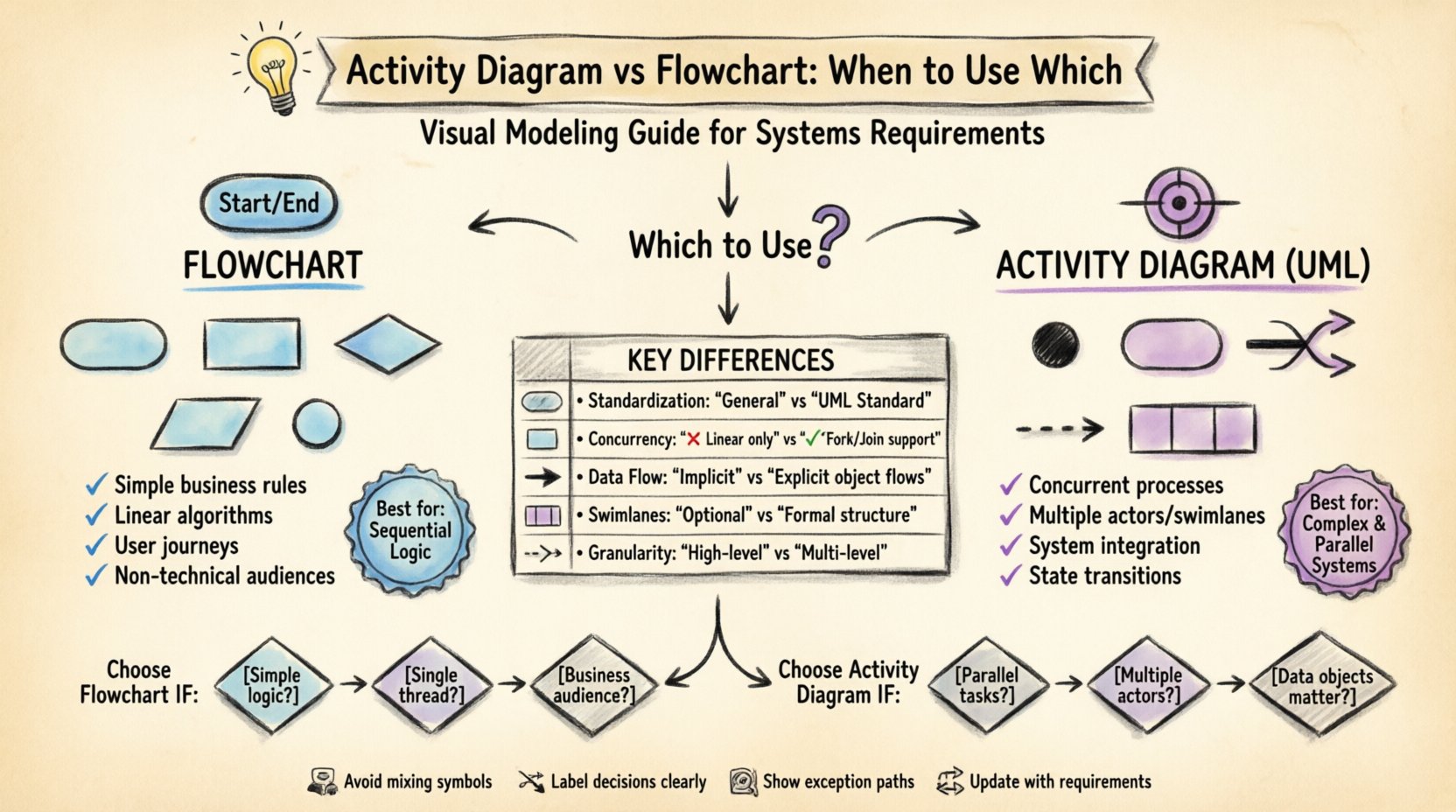
In the landscape of systems engineering and requirements modeling, clarity is paramount. Two of the most common visual tools available to analysts and architects are the flowchart and the activity diagram. While they share similarities in depicting processes, they serve distinct purposes, especially when defining complex system requirements. Misidentifying the appropriate model can lead to ambiguity in logic, overlooked concurrency issues, and misaligned expectations among stakeholders.
This guide explores the nuanced differences between these two modeling techniques. We will examine their structural components, their specific applications within systems requirements, and the criteria for selecting the right tool for your project. Understanding when to deploy a flowchart versus an activity diagram ensures that your documentation accurately reflects the operational reality of the system.
Visual modeling is not merely about drawing pictures; it is a method of communication. It bridges the gap between abstract requirements and concrete implementation. When writing systems requirements, the goal is to define behavior, data flow, and decision points with precision. Both flowcharts and activity diagrams facilitate this, but they do so with different levels of abstraction and detail.
Choosing the correct notation is a strategic decision. It impacts how developers interpret the requirements and how testers verify the system. Below, we break down each tool to help you make that decision.
A flowchart is a classic diagramming tool used to represent an algorithm or process. It focuses primarily on the sequence of operations and the control flow of a program or business rule. Flowcharts are often associated with procedural programming and business process management.
Flowcharts excel in scenarios where the logic is linear and sequential. They are ideal for:
When requirements involve straightforward decision-making without parallel execution, a flowchart provides a clear, easy-to-read map. It answers the question: “What happens next?” in a direct line.
An activity diagram is a specialized type of diagram within the Unified Modeling Language (UML). While it looks similar to a flowchart, it is designed to model the dynamic behavior of a system. It is particularly powerful for systems where multiple processes happen simultaneously or where the state of an object is critical.
Activity diagrams are the preferred choice for:
Where a flowchart asks “What happens next?”, an activity diagram asks “How do these parts work together, and when do they happen?”
To make an informed choice, it is essential to understand the structural and functional distinctions. The following table outlines the primary differences between a flowchart and an activity diagram.
| Feature | Flowchart | Activity Diagram |
|---|---|---|
| Standardization | General-purpose, no strict standard | Part of UML (Unified Modeling Language) |
| Concurrency | Not supported (Linear flow) | Supported (Fork/Join nodes) |
| Granularity | High-level, business logic | High and low-level, system behavior |
| Swimlanes | Optional, often informal | Formal structure (Organizational units) |
| Data Flow | Implicit or minimal | Explicit (Object flows) |
| Best For | Simple processes, algorithms | Complex systems, concurrent tasks |
The decision between these two tools depends heavily on the complexity of the system requirements. Below are specific scenarios to guide your selection process.
Use a flowchart when the requirement is straightforward and does not require modeling of parallel behavior.
Choose an activity diagram when the system behavior involves complexity, multiple actors, or timing constraints.
One of the most significant limitations of a standard flowchart is its inability to represent concurrency. In modern systems, processes rarely happen in a single, straight line. Consider a user placing an order online.
In a flowchart, you might have to choose one sequence over the other, potentially obscuring the fact that validation and inventory reservation happen at the same time. In an activity diagram, you can split the flow into two parallel paths (Fork) and merge them back together (Join) once both are complete. This distinction is critical for system requirements because it dictates performance and resource allocation.
If the requirements state that the inventory must be reserved before the payment is authorized, the Join node ensures that dependency is modeled. If they can happen independently, the Fork node shows that optimization is possible.
As systems grow, so does the complexity of their requirements. A single diagram can easily become unreadable, often called a “spaghetti diagram.” Swimlanes are the mechanism used in activity diagrams to manage this complexity.
Swimlanes divide the diagram into areas where specific actors perform actions. This answers the question: “Who does what?”
While flowcharts can technically use swimlanes, they are less standardized and often implemented inconsistently. Activity diagrams enforce a cleaner structure. For systems requirements, this structure is vital for assigning ownership and defining interfaces between components.
Even with the right tool, poor modeling practices can lead to requirements that are ambiguous or impossible to implement. Common pitfalls include:
Diagrams are not static artifacts; they evolve alongside the project. Here is how to integrate them effectively:
Selecting between an activity diagram and a flowchart is a decision rooted in the nature of the system you are building. If the system is linear, simple, and business-rule heavy, the flowchart remains a powerful, accessible tool. However, if the system involves complex interactions, parallel processing, or strict data flows, the activity diagram offers the necessary precision.
Remember that the goal of systems requirements is not to create a perfect picture, but to create a shared understanding. The best diagram is the one that effectively communicates the required behavior to the developers, testers, and stakeholders involved.
By adhering to the structural strengths of each tool and avoiding common modeling errors, you ensure that your documentation serves as a reliable foundation for the entire development lifecycle. Prioritize clarity, consistency, and accuracy above all else.
