 Visual Paradigm Desktop |
  Visual Paradigm Online
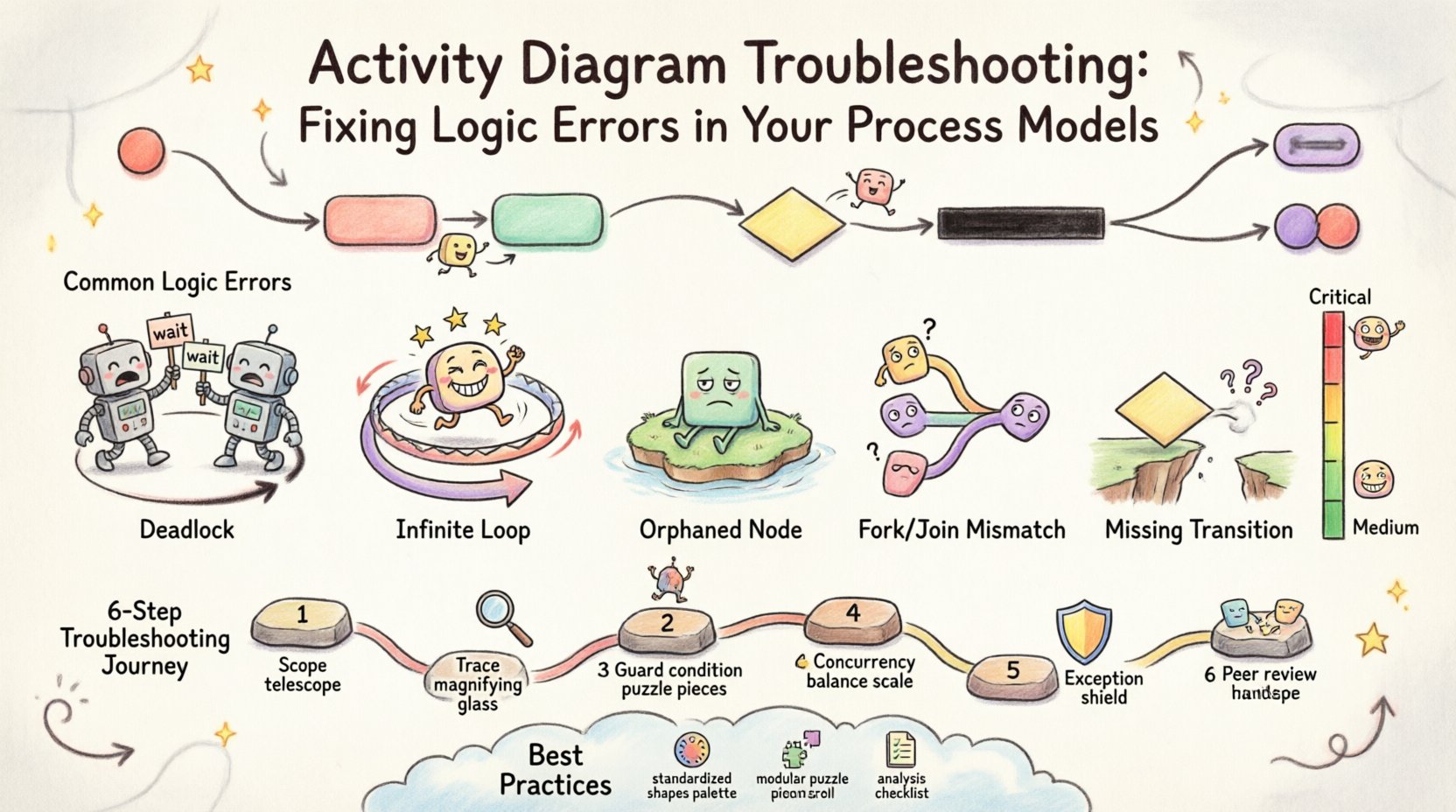
Activity diagrams serve as the backbone of process modeling, offering a visual representation of the flow of control from one activity to another. When these diagrams contain logic errors, the entire system architecture can be compromised. Identifying and resolving these issues requires a methodical approach grounded in the theory of concurrent systems and control flow. This guide provides a comprehensive framework for diagnosing faults, ensuring that your process models accurately reflect the intended operational logic.
Errors in activity diagrams are not merely aesthetic issues; they represent fundamental breakdowns in the logical sequence of events. Whether the error stems from a missing transition, a conflicting guard condition, or a synchronization mismatch, the result is a model that cannot be reliably executed or implemented. By understanding the anatomy of these diagrams and the common pitfalls associated with them, you can maintain high integrity in your documentation.
Before troubleshooting, it is essential to understand the core components that drive an activity diagram. These elements interact to create the narrative of the process.
Each of these components plays a specific role in the lifecycle of a process. When troubleshooting, you must trace the path of the “token” or control signal through these nodes to locate where the flow deviates from expectations.
Logic errors occur when the visual representation of a process does not align with the actual requirements or technical constraints. Below is a detailed breakdown of the most frequent issues encountered during the modeling phase.
A deadlock occurs when two or more activities are waiting for each other to release resources or complete a step, resulting in a standstill. In an activity diagram, this often looks like a path that leads into a loop with no exit condition.
Unlike a deadlock where progress stops completely, a livelock involves continuous state changes without any actual progress. This is often caused by a decision node that flips back and forth between two states based on a condition that never stabilizes.
Orphaned nodes are activities that have no incoming control flow. They are visually present in the diagram but are unreachable from the initial node. Conversely, nodes with no outgoing flow (except final nodes) may indicate premature termination.
Concurrency is a powerful feature of activity diagrams, but it introduces complexity. A mismatch occurs when a fork creates multiple threads, but the join node expects a different number of incoming flows. This leads to synchronization errors where some threads wait forever for others.
Gaps in the flow prevent the model from representing the complete process. This often happens when a decision node has a “false” path that leads nowhere.
Understanding the severity and nature of each error helps prioritize troubleshooting efforts. The table below summarizes the impact of common logic faults.
| Error Type | Severity | Visual Indicator | Impact on Execution |
|---|---|---|---|
| Deadlock | Critical | Circular path with no exit | System hangs indefinitely |
| Orphaned Node | High | Unconnected shape | Functionality is unavailable |
| Fork/Join Mismatch | High | Unequal thread counts | Resource contention or failure |
| Missing Transition | Medium | Broken arrow line | Process skips steps or fails |
| Invalid Guard Condition | Medium | Boolean logic error | Wrong path selected |
| Infinite Loop | High | Repeated cycle | Resource exhaustion |
Resolving logic errors requires a systematic approach. Follow this workflow to validate the integrity of your activity diagrams.
Before diving into the diagram, establish what the process is supposed to achieve. Define the inputs, expected outputs, and the termination conditions. This creates a baseline against which you can measure the model.
Manually trace the path of execution from the initial node to the final node. Use a pen and paper or a digital cursor to follow the arrows. This technique, often called “token tracing,” helps visualize the journey of the process.
Guard conditions are boolean expressions placed on edges leaving decision nodes. These dictate the path the flow takes. Errors here are subtle but common.
Concurrency introduces the highest risk of synchronization errors. Review all fork and join nodes.
Real-world processes encounter errors. A robust activity diagram must account for exceptions.
Human error is the primary source of logic faults. A second set of eyes can catch issues the original author overlooks.
Beyond the basic errors, advanced modeling scenarios introduce unique challenges. These areas require deeper scrutiny.
Sometimes, a process calls itself. This is common in iterative algorithms. Modeling recursion in activity diagrams requires careful handling of the loop back to the start node.
Activities often consume and produce objects. These flows must match the activity requirements.
Processes often have time limits. If an activity takes too long, the process should abort or escalate.
Prevention is better than cure. Adopting best practices during the creation phase reduces the need for extensive troubleshooting later.
Consistency in symbols and layout makes errors easier to spot. Use standard shapes for all nodes and consistent line styles for control flows. Avoid mixing different diagramming styles within the same model.
Large activity diagrams become difficult to manage. Break them down into smaller sub-activities.
Every model relies on assumptions about the environment. Document these clearly.
Even without executing the model, you can analyze its structure.
Process models are living documents. As business requirements change, the diagrams must evolve. Maintaining integrity requires a disciplined approach to updates.
When a requirement changes, update the diagram immediately. Do not leave the model as a legacy artifact.
Schedule periodic reviews of your activity diagrams.
Maintaining the logical integrity of activity diagrams is a continuous process. It demands attention to detail, a solid understanding of flow control, and a commitment to rigorous validation. By systematically identifying deadlocks, loops, and synchronization issues, you ensure that your process models are reliable blueprints for implementation.
Remember that a diagram is only as good as its ability to represent reality. When you encounter logic errors, treat them as opportunities to refine the understanding of the system. Through careful tracing, peer review, and adherence to best practices, you can produce models that are free of critical flaws.
The effort invested in troubleshooting pays dividends in reduced implementation errors and clearer communication. Focus on the structure, validate the flow, and ensure every node has a purpose. This discipline transforms a simple sketch into a robust specification.
