 Visual Paradigm Desktop |
  Visual Paradigm Online
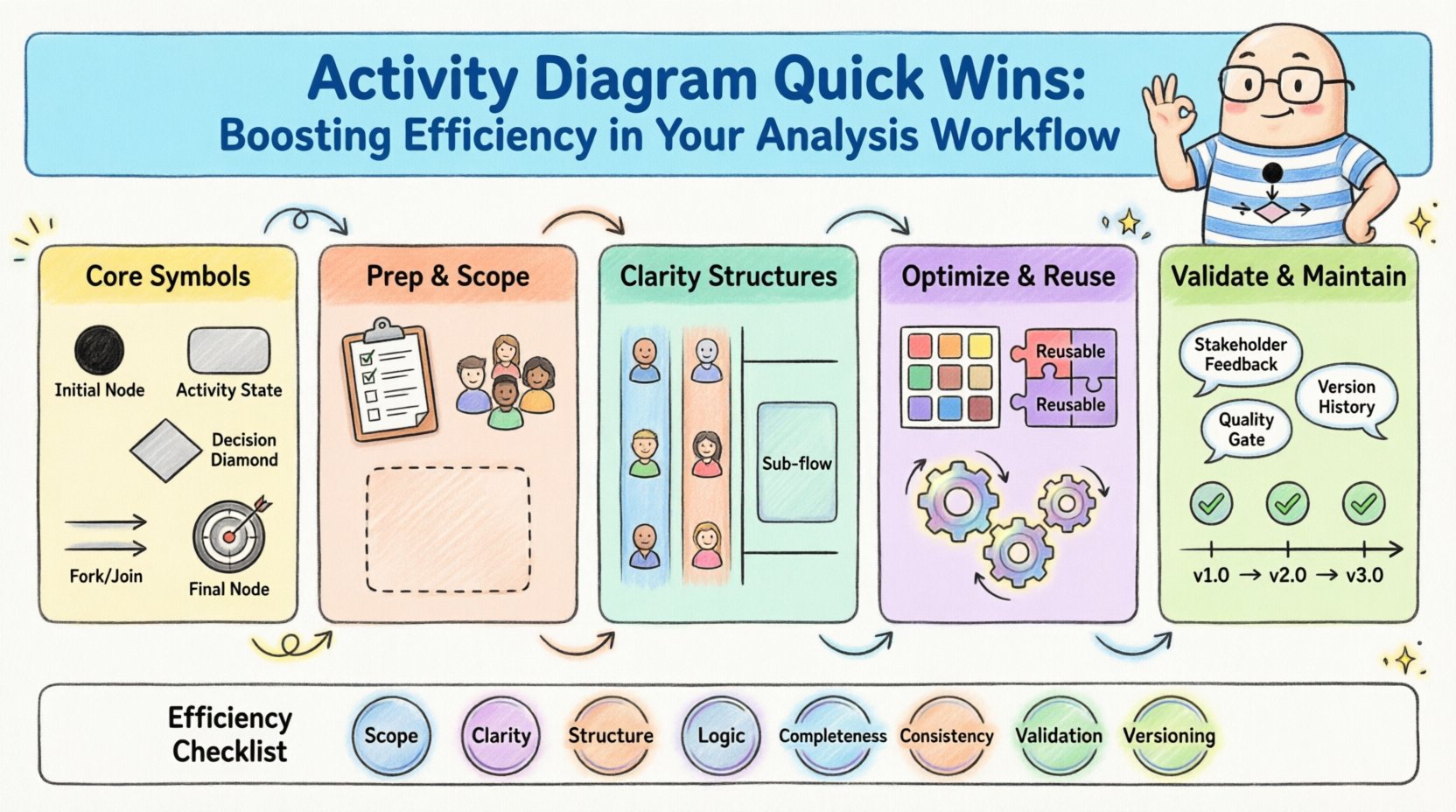
In the complex landscape of system modeling and business analysis, clarity is currency. Activity diagrams serve as a critical bridge between abstract requirements and concrete implementation logic. They visualize the flow of control and data, offering a snapshot of operational processes. However, creating these diagrams often consumes significant time and effort. Without a structured approach, models can become cluttered, confusing, and difficult to maintain. This guide outlines practical strategies to streamline your activity diagram creation process. By focusing on efficiency and clarity, you can enhance the quality of your analysis without unnecessary overhead.
Efficiency in modeling does not mean rushing through steps. It means removing friction from the design process. It involves adopting standards that reduce cognitive load for readers and ensuring that every symbol on the canvas serves a specific purpose. Whether you are mapping a simple transaction flow or a complex enterprise integration, the principles of effective diagramming remain consistent. Let us explore the techniques that transform activity diagrams from time-consuming tasks into valuable assets.
Before optimizing, one must understand the foundational elements. An activity diagram is essentially a flowchart that depicts the dynamic aspects of a system. It focuses on the sequence of actions and the conditions that trigger transitions between states. Unlike sequence diagrams that focus on time and object interaction, activity diagrams focus on the logic of the process itself.
Every diagram relies on a standardized vocabulary. Misusing symbols leads to ambiguity. Here are the core components you should master:
When building a diagram, ensure these symbols are used consistently. Mixing up a decision node with an activity state is a common error that disrupts the logical narrative. Clarity in symbols ensures that stakeholders, developers, and testers all interpret the process in the same way.
Beyond simple sequences, real-world processes involve concurrency and branching. Properly handling these mechanisms prevents bottlenecks in your modeling. For instance, a fork allows multiple actions to happen simultaneously. This is crucial for representing parallel processes like validating an order while checking inventory. A join brings these parallel paths back together, ensuring the process continues only after all branches are complete.
Understanding guard conditions on decision nodes is equally important. These conditions determine which path the flow takes. If a condition is not clearly defined, the diagram becomes a guessing game. Always write explicit conditions, such as “If Balance > 0” rather than vague terms. This precision reduces the need for follow-up questions during the review phase.
Jumping straight into drawing often leads to rework. Preparation is the first step toward efficiency. By defining the scope and gathering necessary information beforehand, you reduce the number of revisions needed later.
Before opening the modeling tool, ensure you have the inputs required to construct the logic. This includes user stories, process maps, or functional specifications. Without these, you risk building a model based on assumptions. Assumptions are the enemy of accuracy.
Focus on the following inputs:
Documenting these details in a text format before modeling helps you focus on the logic rather than trying to remember details while drawing.
A common pitfall is creating diagrams that are too broad. An activity diagram should focus on a specific use case or a coherent subset of functionality. If a diagram attempts to show the entire system lifecycle, it becomes unreadable.
Set clear boundaries for your model. Define where the input enters and where the output leaves. This containment makes the diagram easier to understand and maintain. If a sub-process is complex, consider creating a separate diagram for it and linking the two. This modular approach keeps the main view clean and focused.
Once the logic is defined, the visual structure matters. A well-organized diagram guides the eye and reduces cognitive effort. The layout should follow a natural reading pattern, typically top-to-bottom or left-to-right.
Swimlanes are powerful tools for organizing activity diagrams by responsibility. They divide the diagram into horizontal or vertical sections, each representing a specific actor, department, or system component. This separation clarifies ownership and handoffs.
Benefits of swimlanes include:
However, do not overuse swimlanes. If you have too many, the diagram becomes too wide or tall. Limit the number of lanes to the distinct roles involved in the specific flow. If a lane is empty, remove it.
When a process is too intricate for a single view, use sub-activity nodes. These nodes represent a call to another diagram or a detailed breakdown of a single step. This technique allows you to maintain a high-level overview while keeping detailed logic accessible.
Use sub-activity nodes when:
Labeling these nodes clearly is essential. A label like “Process Payment” is better than “Detailed Payment Logic”. The label should describe the outcome, not the implementation detail.
Efficiency is not just about the diagram itself; it is about how you create and manage it. Adopting a disciplined workflow reduces the time spent on formatting and rework.
Establish a style guide for your modeling team. Consistency in font sizes, line weights, and color usage saves time during reviews. If every diagram looks different, reviewers spend energy adjusting their eyes rather than understanding the content.
Key areas for standardization:
Many processes share common logic. Instead of redrawing the same validation steps for every user flow, create a standard library of activity patterns. This library can include common loops, error handling blocks, or authentication checks.
Using reusable components offers several advantages:
Ensure your modeling platform supports the creation of such libraries. If it does not, consider using external templates that can be imported. The goal is to minimize repetitive drawing.
A diagram is not finished until it is validated. Validation ensures that the model accurately reflects the real-world process and is free of logical errors. Skipping this step leads to implementation bugs and stakeholder confusion.
Present the diagram to the people who perform the work. Subject matter experts are the best validators. They can spot logic gaps that an analyst might miss. A walkthrough should be a dialogue, not a presentation.
During the review, ask specific questions:
Document the feedback and update the diagram accordingly. This iterative process builds trust and ensures the model is useful.
Perform a self-check before sharing the diagram. Look for common errors that waste time during reviews.
| Issue | Description | Fix |
|---|---|---|
| Dangling Flow | A line that ends without connecting to anything. | Connect to a final node or another activity. |
| Unreachable Node | A node that cannot be reached from the initial node. | Ensure a path exists from the start. |
| Dead End | A node that leads nowhere except to a final node prematurely. | Check if the flow should continue elsewhere. |
| Circular Logic | A loop that cannot exit. | Ensure a condition exists to break the loop. |
Regularly auditing your diagrams against these criteria prevents technical debt in your documentation.
Activity diagrams are living documents. They evolve as the system changes. Maintaining them requires a collaborative approach and a clear versioning strategy.
Just as code requires version control, diagrams do as well. Keep track of changes to understand why a specific decision was made. This history is invaluable when new team members join or when auditing past decisions.
Implement a naming convention for your files. Include dates or version numbers (e.g., “Order_Process_v1.2”). Store these files in a central repository where the team can access the latest version. Avoid emailing drafts back and forth, which leads to confusion about which file is current.
Encourage continuous feedback. Do not wait for a formal review meeting to get input. Share drafts early and often. This practice allows for smaller, more manageable changes rather than massive overhauls at the end of a project.
Integrate diagram updates into your change management process. When a requirement changes, update the diagram immediately. This keeps the documentation synchronized with the product, ensuring it remains a reliable reference for development.
To ensure you are following these best practices, use the following checklist before finalizing any activity diagram.
Adhering to this checklist ensures that your diagrams are not just drawings, but functional tools for analysis. It reduces the time spent explaining the diagram and increases the time spent building the system.
Optimizing your activity diagram workflow is an ongoing journey. It requires discipline, attention to detail, and a willingness to adopt standards. By focusing on preparation, structure, and validation, you can create models that are both efficient to produce and effective to consume.
The goal is not to produce the most complex diagram possible. The goal is to produce the clearest diagram possible. Simplicity in design leads to clarity in execution. When your diagrams are easy to read, your team spends less time deciphering logic and more time solving problems. This shift in focus drives productivity and improves the overall quality of the system being built.
Keep your tools flexible, your standards consistent, and your communication open. These habits will serve as the foundation for a robust analysis workflow. With practice, the creation of activity diagrams will become a streamlined part of your daily routine, delivering value at every stage of the development lifecycle.
