 Visual Paradigm Desktop |
  Visual Paradigm Online
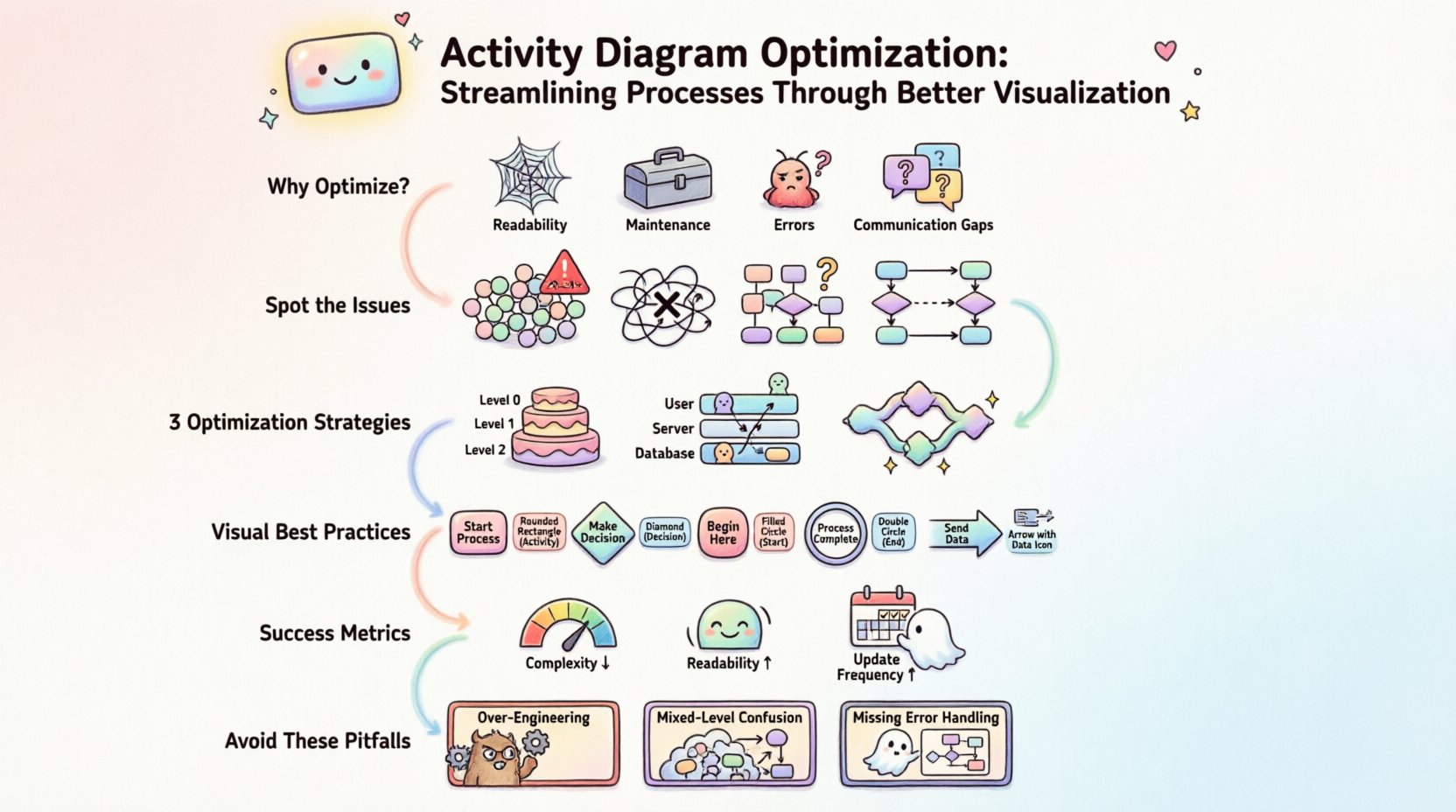
In the landscape of system design and business process management, clarity is currency. When teams attempt to map out workflows, the resulting diagrams often become tangled webs of logic that obscure rather than illuminate. An activity diagram is a powerful tool within the Unified Modeling Language (UML) ecosystem, designed to describe the dynamic aspects of a system. However, a diagram that is overly complex or poorly structured fails its primary purpose: communication. Optimization of activity diagrams is not merely about aesthetics; it is about ensuring accuracy, reducing cognitive load, and facilitating effective decision-making across development and operational teams. This guide explores the methods and principles required to refine process visualization.
Activity diagrams serve as a functional blueprint. They depict the flow from one activity to another, capturing the sequence of actions, decisions, and concurrent processes. Unlike static structural diagrams, activity diagrams focus on behavior. They answer critical questions regarding how data moves through a system and how responsibilities are distributed among different actors or components.
When an activity diagram is unoptimized, several issues arise:
Optimization addresses these pain points by applying standard modeling conventions and simplifying the representation of logic. The goal is to create a model that is self-documenting and resilient to change.
Before optimizing, one must diagnose the current state of the diagram. Common patterns indicate where the process flow has become convoluted. Recognizing these patterns is the first step toward a streamlined workflow.
A single diagram containing more than 20 to 30 nodes often exceeds the cognitive capacity of a reader. When too many activities exist on one canvas, the viewer loses the context of the overall process. This often happens when a high-level business process is mapped without abstraction. The solution involves breaking the model into hierarchical levels.
Lines crossing each other without clear markers create confusion. In graph theory, this is known as a planar embedding issue. When control flows intersect, it becomes difficult to trace the path of execution. Using orthogonal routing (right-angle lines) instead of diagonal lines helps distinguish between connections.
Using different shapes for similar elements violates standard UML conventions. For instance, using a diamond for a decision in one section and a hexagon in another confuses the reader. Consistency in shape and color coding is essential for professional documentation.
Multiple decision nodes that check the same condition in sequence can be merged. If a condition determines whether to proceed to Path A or Path B, and both paths eventually merge, the logic can often be simplified. Redundant checks increase the surface area for potential errors.
Refining an activity diagram requires a systematic approach. The following strategies provide a framework for improving the quality and utility of your process models.
Complex processes should be decomposed into manageable sub-processes. This is often achieved using the concept of expanded nodes or subgraphs. Instead of drawing every single step of a payment processing workflow on one page, create a summary activity labeled “Process Payment” and define its internal logic in a separate, linked diagram.
This hierarchical approach ensures that stakeholders can view the system at the appropriate level of granularity without being overwhelmed.
Swimlanes (or partitions) are crucial for assigning responsibility. They divide the diagram into areas where specific actors, roles, or system components perform their activities. Optimization here involves:
Parallel processing is a key strength of activity diagrams, often represented by fork and join nodes. However, improper handling can lead to deadlock scenarios or unclear synchronization points. Optimization involves:
While structure is paramount, visual presentation significantly impacts comprehension. Adhering to visual standards ensures that the diagram is interpreted uniformly across different teams.
| Element | Standard Shape | Optimization Tip |
|---|---|---|
| Activity | Rounded Rectangle | Keep labels concise (verb + noun). |
| Decision | Diamond | Label branches clearly with True/False or Yes/No. |
| Initial Node | Filled Circle | Ensure only one entry point per diagram. |
| Final Node | Filled Circle | Use a double circle for completion success. |
| Object Flow | Arrow with Object Icon | Ensure data dependency is explicit. |
Text within the diagram is a primary source of information. Overcrowding nodes with text obscures the flow. Guidelines for labeling include:
An activity diagram rarely exists in isolation. It is part of a larger modeling ecosystem. Optimization requires ensuring consistency with other diagram types.
The activities in the diagram should correspond directly to the scenarios described in the use case diagram. If an activity performs a function not covered by a use case, it indicates scope creep. Conversely, if a use case lacks a corresponding activity, the implementation plan is incomplete.
Sequence diagrams focus on the interaction between objects over time, while activity diagrams focus on the flow of control. The objects involved in the activity diagram should match the participants in the sequence diagram. This cross-referencing validates the logical flow of data.
Activity diagrams often include object flows to show how data is transformed. These must align with the data model. If an activity produces an object, that object must be defined in the class diagram. This ensures that the dynamic behavior matches the static structure.
A diagram is a living document. As systems evolve, the activity diagrams must evolve with them. Optimization includes establishing a maintenance strategy.
How do you know if the optimization was successful? Quantitative and qualitative metrics can help assess the quality of the diagram.
Even with best intentions, modelers often fall into traps that degrade the utility of the diagram.
Trying to model every edge case in the initial diagram leads to unnecessary complexity. Focus on the happy path and major exception paths first. Add details as the system design matures.
Combining high-level business logic with low-level technical implementation details in the same diagram confuses the audience. Keep business logic separate from technical implementation details unless the audience is technical.
Many diagrams show the successful flow but omit error handling. An optimized diagram must account for failure states. Where does the flow go if a database connection fails? If a user input is invalid? These paths must be explicit.
Optimizing activity diagrams is a discipline that balances technical precision with visual clarity. By adhering to standard conventions, decomposing complex logic, and maintaining consistency with other models, teams can create process visualizations that truly serve their purpose. The result is a reduction in ambiguity, faster development cycles, and a shared understanding of the system among all stakeholders. Continuous refinement ensures that the documentation remains a valuable asset rather than a static relic. Investing time in these practices yields significant returns in system reliability and team efficiency.
