 Visual Paradigm Desktop |
  Visual Paradigm Online
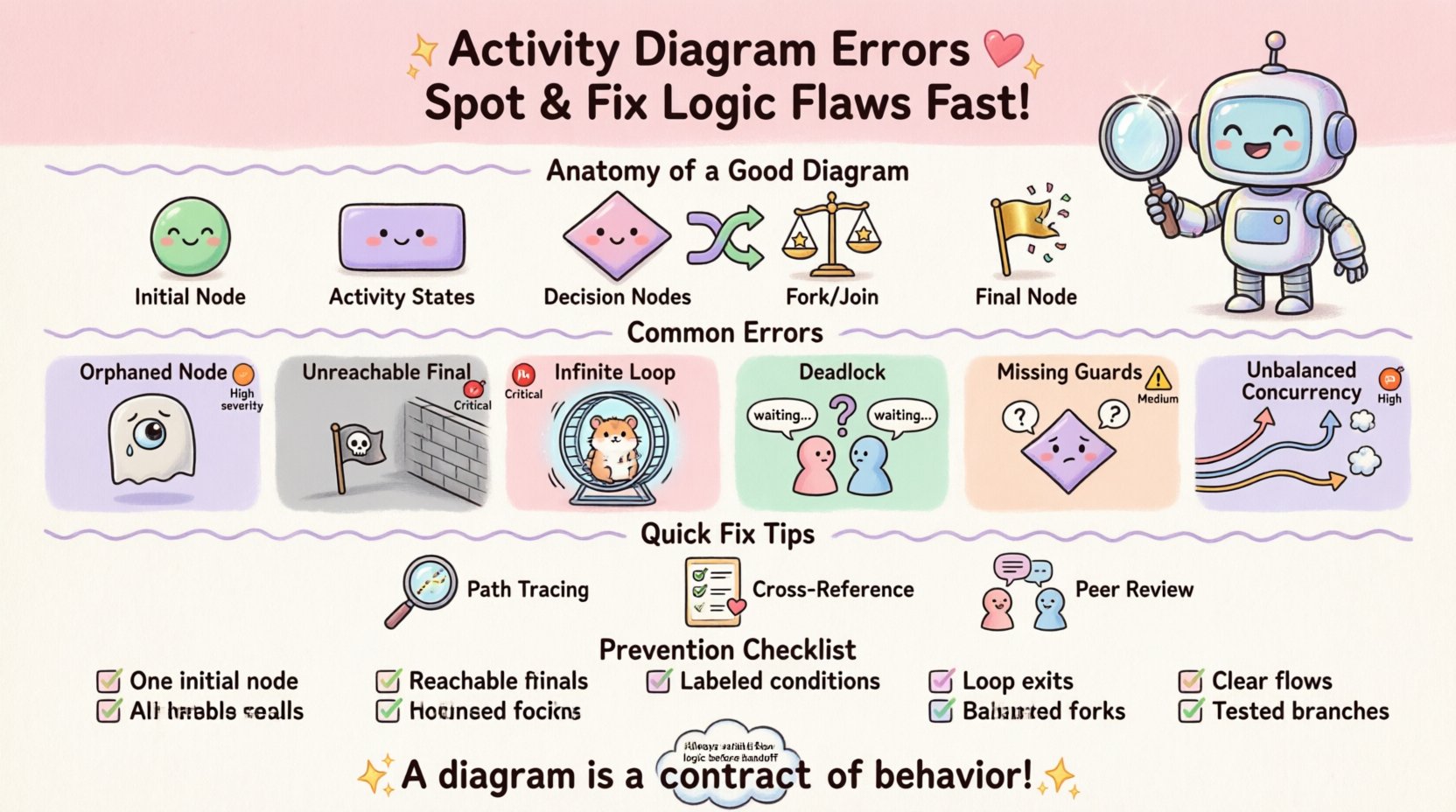
Activity diagrams serve as the backbone of behavioral modeling in system design. They map out the flow of control and data, translating abstract requirements into actionable visual logic. However, even minor oversights in these diagrams can cascade into significant issues during implementation. A misplaced transition or an overlooked guard condition can lead to deadlocks, infinite loops, or incomplete processes. This guide provides a rigorous examination of common activity diagram errors, offering a systematic approach to identification and correction.
Before addressing specific errors, it is crucial to understand the structural components that make up a robust activity diagram. These elements include initial nodes, activity states, decision nodes, merge nodes, and final nodes. Control flow arrows dictate the sequence, while object flow arrows represent data movement. When these components interact incorrectly, the diagram fails to represent the intended system behavior accurately.
Errors often stem from a disconnect between the visual representation and the underlying business logic. For instance, a decision node might lack a defined condition for every outgoing path, leaving the flow ambiguous. Alternatively, concurrent threads might be modeled without proper synchronization mechanisms, creating race conditions in the logic representation.
The following table outlines the most frequent errors encountered during activity diagram construction. Understanding these categories helps in prioritizing review efforts.
| Error Type | Visual Symptom | Logical Consequence | Severity |
|---|---|---|---|
| Orphaned Node | Node with no incoming arrows | Process cannot reach this state | High |
| Unreachable Final Node | Final node disconnected from flow | System never terminates cleanly | Critical |
| Infinite Loop | Circular path without exit condition | Process hangs indefinitely | Critical |
| Deadlock | Two paths waiting on each other | System freezes | Critical |
| Missing Guards | Decision node without conditions | Unpredictable branching | Medium |
| Unbalanced Concurrency | Fork without corresponding Join | Resource leaks or lost threads | High |
Identifying errors requires a methodical walk-through of every possible path. Below is a detailed analysis of specific flaws that compromise diagram integrity.
An orphaned node is any activity state that has no incoming control flow. In a valid diagram, every step in the process must be reachable from the initial node. If a node is isolated, it implies that the system can never execute that specific action, rendering the diagram incomplete.
Why it happens: This often occurs during iterative design when a new feature is added but the connection to the main flow is forgotten. It may also happen when refactoring a diagram and deleting a connecting arrow without realizing the dependency.
How to fix: Trace every node backwards from the final node. If you cannot reach the initial node, the path is broken. Re-establish the connection from the preceding activity or decision node.
A final node represents the successful termination of a process. If a final node cannot be reached from the start, it indicates a dead branch in the logic. While this might seem harmless if the branch is never taken, it suggests a logical inconsistency where a valid end state exists but cannot be achieved.
Why it happens: Designers often create multiple final nodes for different outcomes (success vs. failure). If the failure path is disconnected due to a missing arrow, the system appears to hang in the failure state.
How to fix: Ensure every decision node has an “else” condition that leads to a termination point. Every path must eventually converge or terminate.
An infinite loop occurs when control flow enters a cycle without an exit condition. In the context of activity diagrams, this represents a process that never completes. This is particularly dangerous when modeling automated workflows or background tasks.
Why it happens: This is common in retry logic. If a “Retry” branch loops back to the start of an activity without a counter or a maximum attempt limit, the flow is theoretically infinite.
How to fix: Introduce guard conditions on the loop. Add a decision node that checks a counter or a status flag. Ensure there is a clear exit path based on a terminating condition.
Deadlocks arise when two or more threads are waiting for each other to release resources. In an activity diagram, this manifests as parallel branches (forks) that synchronize (join) incorrectly. If one branch waits for an output that the other branch produces, but the other branch waits for the first, the system halts.
Why it happens: Complex systems often require parallel processing. If the synchronization point (join node) is placed before the necessary data is generated by one of the branches, a deadlock is modeled.
How to fix: Review the order of operations in parallel threads. Ensure that data dependencies are respected. Use markers to indicate which data is required at the join point.
Decision nodes dictate the path based on conditions. If a decision node has multiple outgoing arrows but no labels or guard conditions, the logic is ambiguous. The modeler does not know when to take which path.
Why it happens: Designers may assume the flow is obvious or forget to label the arrows during the initial sketching phase.
How to fix: Every outgoing arrow from a decision node must be labeled with a boolean expression or a specific condition. The sum of all conditions should cover all possibilities (True/False).
Spotting these errors requires more than a quick glance. A structured review process is essential to ensure accuracy.
Once errors are identified, they must be corrected systematically. Refactoring an activity diagram can be complex, especially if it is linked to other models.
Do not change the entire diagram at once. Focus on the specific section where the error occurs. Isolate the problematic branch or concurrency block.
Sketch the corrected flow on a separate layer or scratchpad. Verify the new logic against the requirements before applying it to the main diagram.
Ensure that new arrows connect to valid nodes. Check that control flows do not cross over object flows inappropriately, which can cause confusion.
Review all decision nodes. Ensure that every outgoing path is clearly labeled. Use standard naming conventions for conditions (e.g., “Is Valid”, “Has Permission”).
Preventing errors is more efficient than fixing them. Establishing standards for diagram creation can minimize the occurrence of logical flaws.
Ignoring errors in activity diagrams is not a passive choice; it carries a tangible cost. When a diagram contains logic flaws, the downstream impact is significant.
Developers rely on diagrams to understand system behavior. If the logic is flawed, they will implement the wrong behavior. Fixing code is significantly more expensive than fixing a diagram.
Testers use diagrams to create test cases. If the diagram shows a path that doesn’t exist in the code, or vice versa, test coverage becomes inaccurate. This leads to bugs slipping into production.
Business stakeholders use diagrams to verify requirements. If the diagram does not match the actual process, trust is eroded. Misalignment can lead to features that do not meet user needs.
Unresolved concurrency errors or deadlocks in the diagram often translate to runtime crashes or hangs in the deployed system. This affects availability and performance.
Before finalizing an activity diagram, run through this comprehensive checklist to ensure logical soundness.
Maintaining high-quality activity diagrams requires discipline and attention to detail. By understanding the common pitfalls—such as orphaned nodes, unreachable finals, and concurrency issues—modelers can create accurate representations of system behavior. Regular reviews, adherence to standards, and a focus on logical completeness are key to avoiding costly errors.
Remember that a diagram is a contract of behavior. If the contract is flawed, the execution will fail. Dedicate time to review the logic flow, validate every path, and ensure that the visual representation matches the intended system reality. This diligence pays off in reduced development time and higher system reliability.
