 Visual Paradigm Desktop |
  Visual Paradigm Online
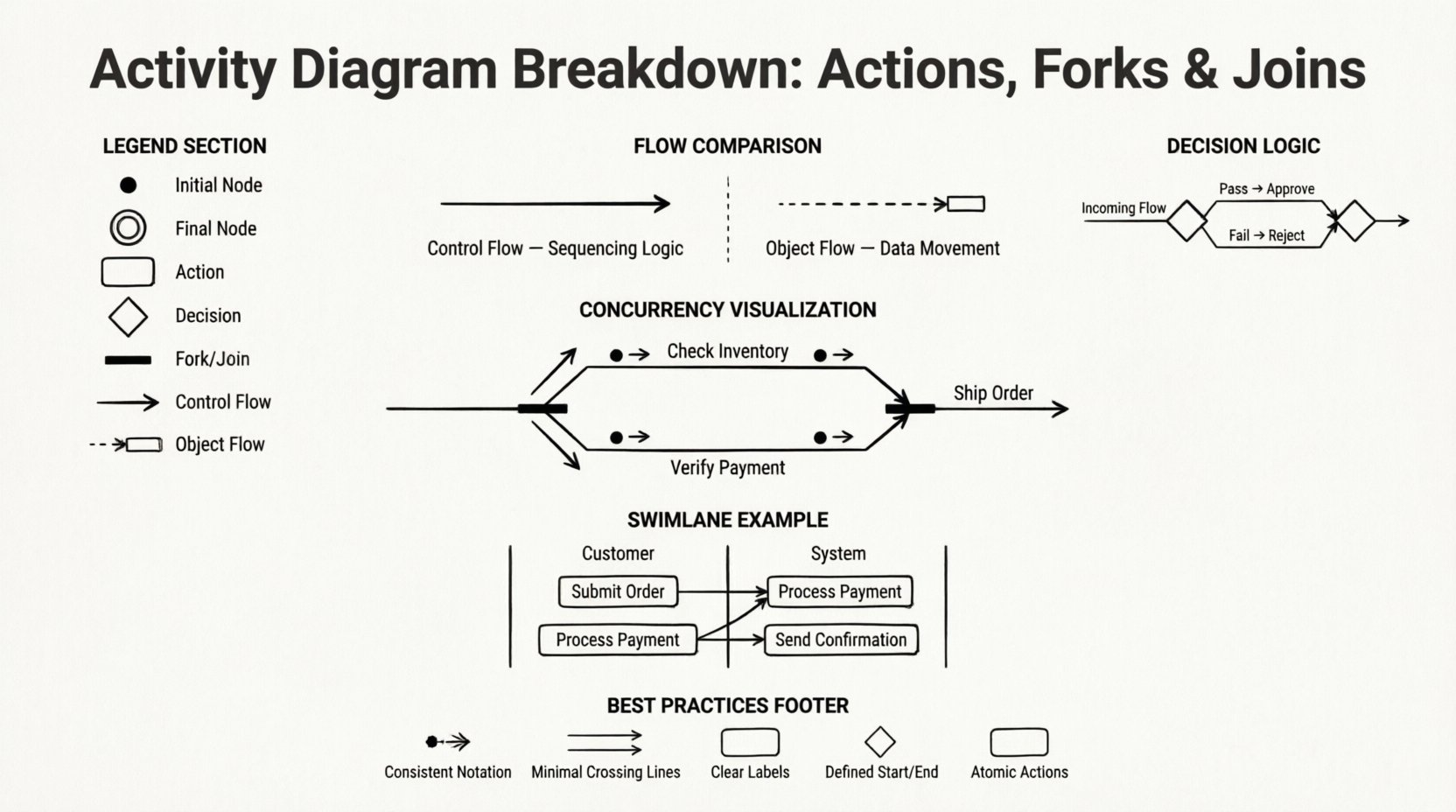
Activity diagrams serve as a fundamental tool within the Unified Modeling Language (UML) ecosystem. They provide a dynamic view of system behavior, focusing on the flow of control and data from one activity to another. Unlike static structure diagrams, these diagrams map out the logic and sequence of operations. This guide dissects the core mechanics of activity diagrams, specifically targeting actions, forks, and joins. By understanding these elements, you can model complex workflows with precision and clarity.
An activity diagram describes the business or system processes from start to finish. It is essentially a flowchart that captures the sequence of activities. While class diagrams show structure and sequence diagrams show interactions, activity diagrams show behavior. They are particularly useful for describing the logic of a use case.
Key characteristics include:
The activity node, commonly referred to as an action, represents a specific step or operation within the workflow. It is the atomic unit of behavior in this context. Actions can range from simple operations like “validate user” to complex sub-processes.
When modeling an action, consider the inputs and outputs. An action consumes tokens from incoming edges and produces tokens for outgoing edges. This token movement is the engine that drives the diagram.
Actions often manipulate objects. For example, a “Process Order” action might consume an “Order Object” and produce a “Payment Confirmation Object”. Understanding the data flow is as critical as the control flow.
To fully understand activity diagrams, one must distinguish between how control moves and how data moves. Both are represented by edges, but their semantics differ.
| Feature | Control Flow | Object Flow |
|---|---|---|
| Purpose | Sequencing logic | Data movement |
| Visual Style | Solid line with arrow | Often dashed or labeled object node |
| Trigger | Completion of previous action | Availability of data |
| Dependency | Time-based sequence | Data-based dependency |
Real-world processes rarely follow a single straight line. Branching logic is essential. This is where decision nodes come into play.
A decision node is a diamond shape. It splits the flow into multiple paths based on a condition. Only one path is taken at a time. For example, if a validation check passes, the flow goes to “Approve”. If it fails, it goes to “Reject”.
A merge node brings multiple paths back together. It does not synchronize them in the sense of waiting for all to arrive; it simply accepts any incoming flow. If path A finishes, the flow continues. If path B finishes, the flow continues. This is distinct from a join node.
This is the most critical and often misunderstood aspect of activity diagrams. Concurrency allows multiple activities to happen simultaneously. This is achieved through Fork and Join nodes.
A fork node is a thick horizontal bar. It takes a single incoming control flow and splits it into multiple outgoing flows. When a token reaches the fork, it duplicates itself. Tokens travel down all outgoing edges simultaneously.
Key characteristics of a Fork:
A join node is also a thick horizontal bar. It waits for tokens to arrive on all incoming edges. Once every incoming edge has received a token, the join node fires, and a single token proceeds to the next activity. This ensures synchronization.
Key characteristics of a Join:
Consider an order processing system. When an order arrives:
Both paths must complete successfully. A join node ensures that the order is only shipped if both inventory is confirmed and payment is verified. If either path fails, the flow is redirected to a failure handler before reaching the join.
Understanding the timing is vital. A join node is not a merge node. A merge node takes the first available token. A join node waits for all tokens. If you use a merge node where a join is required, you risk data races or incomplete states.
As diagrams grow, they become difficult to read. Swimlanes help organize activities by responsibility. They divide the diagram into horizontal or vertical bands, each representing a specific actor, role, or system component.
Each activity node belongs to a specific lane. Control flows can cross lanes, indicating a handoff. For instance, a “Customer” lane might contain “Submit Order”, while a “System” lane contains “Process Payment”. The arrow crossing from Customer to System represents the trigger.
Not every detail belongs in the main diagram. Subactivities allow you to group related actions into a single node. This node can be expanded later into its own activity diagram.
Activity diagrams are not just about logical sequence; they are also about time. Events can trigger actions. A timer event can indicate that a process must start after a specific duration.
Some activities are triggered by external events, such as a user clicking a button or a sensor detecting heat. These are often represented by a note or a specific trigger symbol attached to the action.
Even experienced modelers make mistakes. Avoiding these common errors ensures your diagrams remain accurate and useful.
An orphan join occurs when a join node does not have a corresponding fork. This breaks the logic of concurrency. If you join paths that were never forked, the synchronization logic is invalid.
Sometimes, due to poor logic flow, an activity node cannot be reached from the initial node. This often happens when decision paths are not fully mapped. Every node should be reachable.
Using too many decision nodes can create a “spaghetti diagram”. If a decision has more than three or four outcomes, consider grouping them or using a separate diagram.
Do not treat data flow as control flow. Just because data is available does not mean the process is ready to continue. Ensure you distinguish between the availability of an object and the permission to execute an action.
To maintain high quality in your documentation, follow these guidelines.
Activity diagrams do not exist in isolation. They work best when integrated with other UML diagrams.
Use case diagrams provide the high-level scope. Activity diagrams provide the internal detail for a specific use case.
Class diagrams define the structure of the data. Activity diagrams define the behavior that manipulates that data. Ensure the attributes used in the activity diagram exist in the class diagram.
State diagrams focus on the state of an object. Activity diagrams focus on the flow of control. For complex state transitions, state diagrams are often better. For business processes, activity diagrams are superior.
Real systems handle errors. Activity diagrams must account for this. Exception flows are often depicted as branches from an activity node that lead to a termination or error handling node.
To recap the essential components of an activity diagram:
Creating an activity diagram is an iterative process. Start with a high-level overview. Then, drill down into specific actions. Add forks and joins where concurrency is necessary. Use swimlanes to assign responsibility. Review the diagram with stakeholders to ensure the logic matches the business requirements.
Remember that a diagram is a communication tool. If a stakeholder cannot understand the flow without explanation, the diagram needs refinement. Clarity is the primary objective. Avoid unnecessary complexity. If a fork and join are not needed for synchronization, do not use them. Simplicity leads to better maintenance and understanding.
By mastering the mechanics of actions, flows, and synchronization points, you gain the ability to model complex systems effectively. These diagrams serve as a blueprint for development and a map for maintenance. They bridge the gap between abstract requirements and concrete implementation.
Focus on the logic, respect the tokens, and maintain the structure. This disciplined approach ensures that your activity diagrams remain valuable assets throughout the lifecycle of the software or system you are designing.
