
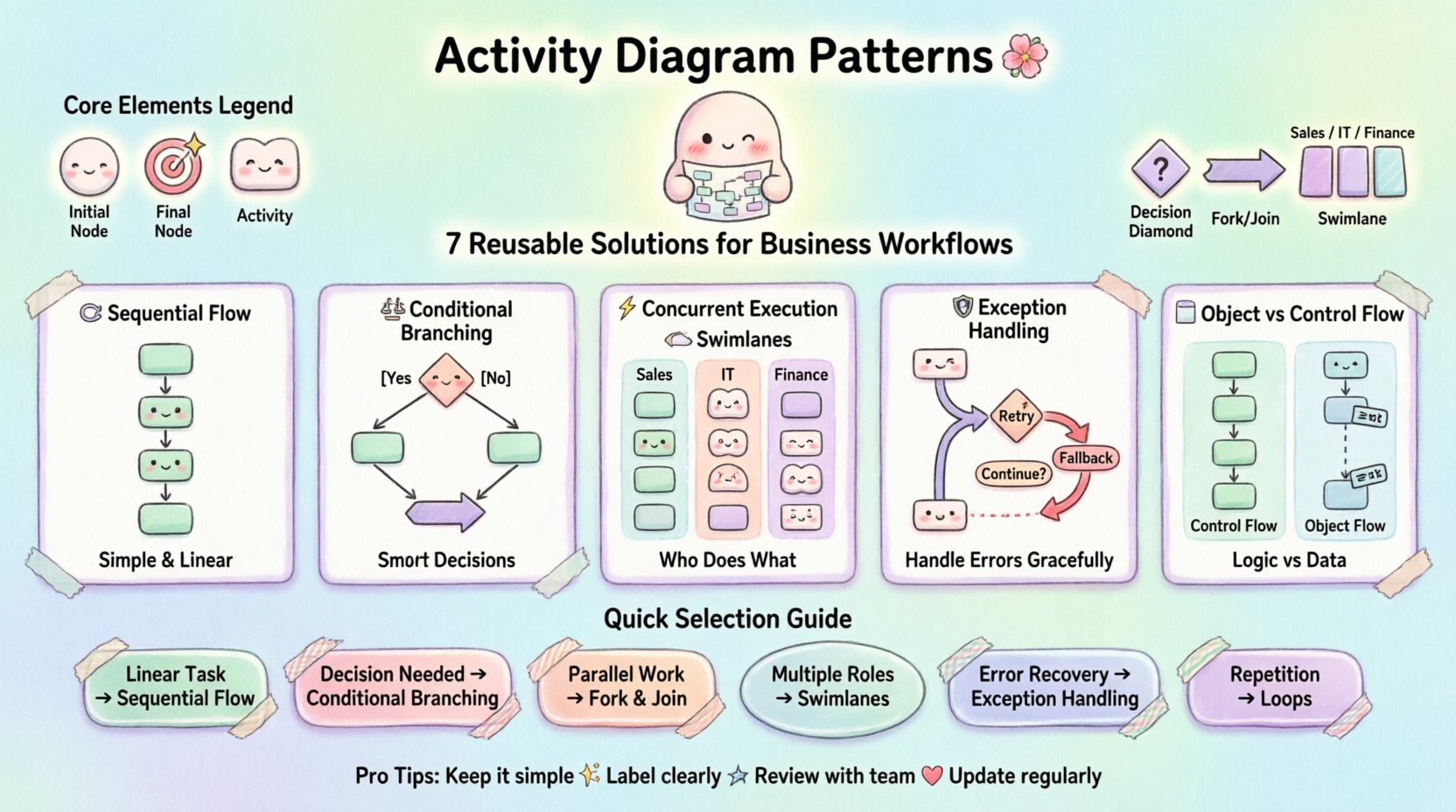
Business processes are complex. They involve decisions, parallel tasks, retries, and handoffs between different teams or systems. Without a structured approach to modeling these flows, documentation becomes messy and logic gets lost. Activity diagrams provide a visual language to describe these behaviors. However, drawing every process from scratch is inefficient. Activity diagram patterns offer proven templates that address common scenarios. This guide explores how to leverage these reusable solutions to clarify workflows and reduce ambiguity.
By adopting standard patterns, teams can focus on business logic rather than wrestling with diagram syntax. This approach ensures consistency across documentation and speeds up the modeling process. Whether you are designing a new system or auditing an existing one, these patterns serve as a foundation for clarity.
Before applying specific patterns, it is essential to understand the core components. An activity diagram represents the flow of control from one activity to another. It is dynamic, showing how actions occur over time. The following elements form the basis of every pattern:
These building blocks allow for the construction of complex logic. When combined, they form the patterns discussed in the following sections.
This is the most fundamental pattern. It describes a linear progression of steps where one activity must complete before the next begins. It is the default behavior when no parallelism or decision points exist.
This pattern minimizes cognitive load. Users can trace the path from start to finish without needing to consider alternative paths. It is ideal for standard operating procedures where the outcome is predictable.
Real-world logic rarely follows a single straight line. Decisions must be made based on data or state. The branching pattern introduces logic gates that determine the path forward.
| Aspect | Guideline |
|---|---|
| Labeling | Always label edges with conditions to avoid ambiguity. |
| Completeness | Ensure all possible outcomes are covered (e.g., Yes/No). |
| Complexity | Limit depth to prevent diagrams from becoming unreadable. |
When modeling this pattern, avoid creating “spaghetti logic.” Keep conditions simple. If a decision requires multiple variables, consider splitting the diagram or creating sub-activities. This keeps the main view clean while preserving detail where needed.
Many business processes involve tasks that happen simultaneously. A user submits a form, and the system simultaneously sends an email and logs the entry. This pattern handles parallelism.
This pattern is critical for performance modeling. It highlights where bottlenecks might occur if one parallel task takes significantly longer than the others. For example, if a background task fails, the Join node might block, causing a timeout in the main flow.
Processes rarely happen in a vacuum. They involve different actors. Swimlanes partition the diagram to show who is responsible for each activity. This adds context to the flow.
When drawing swimlanes, keep the flow direction consistent. Avoid crossing lines between lanes if possible, as this creates visual noise. If a task spans multiple lanes, consider splitting it into sub-activities within the specific lane.
Things go wrong. Systems crash, data is invalid, or network connections fail. A robust activity diagram must account for failure states. This pattern focuses on error management.
Using this pattern prevents the model from assuming everything works perfectly. It forces stakeholders to consider what happens when the process deviates from the happy path. This is vital for system reliability and user trust.
Some processes repeat until a condition is met. This could be a validation loop, a data import process, or a user interaction loop. The loop pattern defines repetition within the flow.
Be careful with infinite loops. Always ensure there is a logical exit. In a diagram, this means the decision node must have a “False” path that exits the loop structure. For example, a “While Data Exists” loop must eventually reach a state where Data Does Not Exist.
Activity diagrams often confuse control flow (when things happen) with object flow (what data moves). Distinguishing these is important for accurate modeling.
Using both correctly provides a complete picture. Control flow ensures the logic is sound. Object flow ensures the data requirements are met. For complex systems, showing how data transforms as it moves through the diagram helps developers understand dependencies.
Adopting these patterns requires discipline. Here are practical steps for integrating them into your workflow.
Even with patterns, mistakes happen. Be aware of these common issues.
A diagram that cannot be updated becomes obsolete. Design for change.
When a process changes, update the pattern first. If a loop condition changes, update the decision node. If a new actor is added, insert a new swimlane. This structured approach reduces the effort required to maintain documentation over time.
Choosing the right pattern depends on the nature of the problem. Use the table below to guide your selection.
| Problem Type | Recommended Pattern | Key Feature |
|---|---|---|
| Linear Task | Sequential Flow | Single path, no branches |
| Decision Required | Conditional Branching | Decision nodes with guards |
| Parallel Work | Fork and Join | Concurrent threads |
| Multiple Roles | Swimlanes | Responsibility partitioning |
| Error Recovery | Exception Handling | Retry and fallback paths |
| Repetition | Iteration/Loops | Entry and exit conditions |
Effective modeling is about communication, not just drawing. Patterns provide the vocabulary to express complex logic clearly. By reusing these solutions, teams reduce the time spent designing the diagram itself and focus more on the value of the process. Consistency in application leads to better understanding across the organization. As systems evolve, these patterns remain constant, providing a stable framework for documentation.
Start by identifying the recurring problems in your current workflows. Map them to the patterns described here. Implement them in your next modeling session. Over time, you will build a library of proven solutions that accelerates your design process and improves the quality of your system specifications.
Remember that diagrams are tools. Their value lies in the insights they generate. Use the patterns to expose risks, clarify responsibilities, and align expectations. This disciplined approach to activity modeling supports better decision-making and more robust system designs.