
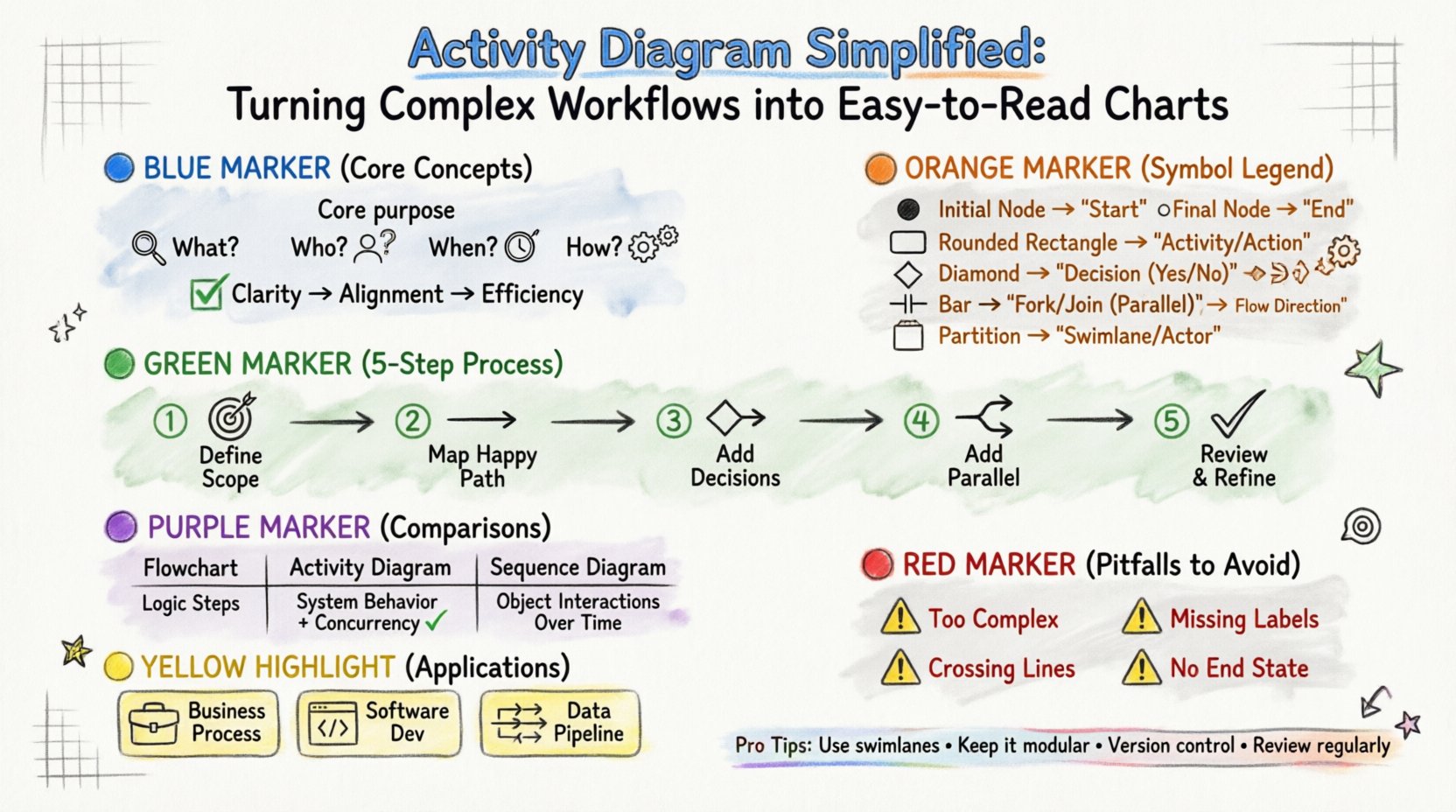
Visualizing processes is essential for clarity. When a team needs to understand how a system operates, raw text often falls short. This is where an Activity Diagram becomes invaluable. It provides a visual representation of the flow of control and data from one activity to another. By breaking down intricate procedures into manageable steps, stakeholders can identify bottlenecks, redundancies, and opportunities for optimization.
This guide explores the mechanics of creating effective activity diagrams. It covers the fundamental symbols, the logic behind the flow, and strategies for managing complexity without losing clarity. Whether you are designing a software feature or mapping a business operation, understanding these visual tools is crucial.
An activity diagram is more than just a flowchart. While they share similarities, the activity diagram places a specific emphasis on the concurrent nature of processes and the state of objects throughout the workflow. It answers specific questions:
Clarity in modeling reduces the risk of miscommunication. When developers, analysts, and business owners look at the same diagram, they share a unified understanding of the expected behavior. This alignment saves time during development and testing phases.
Every diagram is built from a set of standard elements. Knowing what each component represents allows you to construct accurate models. The notation is standardized to ensure that anyone familiar with the system can interpret the chart.
Here are the primary building blocks you will encounter:
| Symbol Name | Visual Representation | Function |
|---|---|---|
| Initial Node | ● (Filled Circle) | Start of the workflow |
| Final Node | ⦿ (Circle with Border) | End of the workflow |
| Decision Node | ◆ (Diamond) | Branching based on conditions |
| Activity State | ▭ (Rounded Rectangle) | An action being performed |
| Fork | —|— (Horizontal Bar) | Starts parallel flows |
| Join | |—| (Horizontal Bar) | Synchronizes parallel flows |
| Partition | Box with Label | Categorizes activities by actor |
Creating a diagram requires a logical approach. Rushing into drawing without a plan often leads to cluttered charts that are difficult to follow. Follow this structured method to build a clear and effective model.
Before drawing the first shape, determine what the diagram covers. A common mistake is trying to map the entire enterprise in one view. Instead, focus on a specific use case or process.
Start with the ideal path. This is the “happy path” where everything proceeds without errors or deviations. Draw the sequence of actions from start to finish using the activity states.
Real-world processes rarely follow a single straight line. Add decision nodes where conditions determine the next step. Label the outgoing arrows with the condition that must be met.
Some tasks happen simultaneously. Use fork and join nodes to represent these concurrent activities. This helps visualize where resources are utilized in parallel.
Once the diagram is complete, step back and review it. Check for logical consistency. Does every path lead to a valid state? Are there any isolated nodes?
As workflows grow, a single column of activities becomes overwhelming. Partitions, often called swimlanes, organize the diagram by assigning responsibility to specific actors, departments, or system components.
It is common to confuse activity diagrams with other modeling tools. Understanding the distinction ensures you use the right tool for the right job.
Flowcharts focus on the logical steps of a program or algorithm. Activity diagrams focus on the behavior of the system and the state of objects. Activity diagrams support concurrency natively, whereas standard flowcharts often struggle with parallel processes.
Sequence diagrams emphasize the interaction between objects over time. They show messages passed between components. Activity diagrams emphasize the flow of control within a single process. Use sequence diagrams for detailed interaction logic and activity diagrams for high-level process flows.
State machine diagrams track the state of a single object. Activity diagrams track the flow of a task. They complement each other; an activity diagram can trigger a state change in an object.
Even experienced modelers make mistakes. Being aware of common errors helps you produce cleaner documentation.
Activity diagrams are versatile. They apply to various domains beyond software development.
Organizations use these diagrams to map standard operating procedures. They help identify inefficiencies in administrative workflows. For example, a loan approval process can be visualized to see where bottlenecks occur.
Developers use activity diagrams to plan the logic of a feature. Before writing code, the team can agree on the flow of data and control. This reduces the need for refactoring later.
When processing large datasets, the steps involved can be complex. An activity diagram outlines the ETL (Extract, Transform, Load) pipeline. It ensures that data transformation steps occur in the correct order.
Processes evolve. A diagram that was accurate last year may be obsolete today. Keeping documentation current is a critical part of the modeling lifecycle.
Mastering the creation of activity diagrams requires practice and discipline. It is not about drawing pretty pictures; it is about modeling logic accurately. By using standard symbols, organizing content with partitions, and avoiding common pitfalls, you create a tool that enhances understanding.
When a team shares a clear visual model, collaboration improves. Decisions are made faster because the path forward is visible. Whether you are mapping a simple login sequence or a complex manufacturing line, the principles remain the same: clarity, logic, and precision.
Start with a small scope. Define your boundaries. Draw the happy path first. Then add the branches. Review the logic. Refine the layout. With this approach, even the most complex workflows can be simplified into easy-to-read charts.