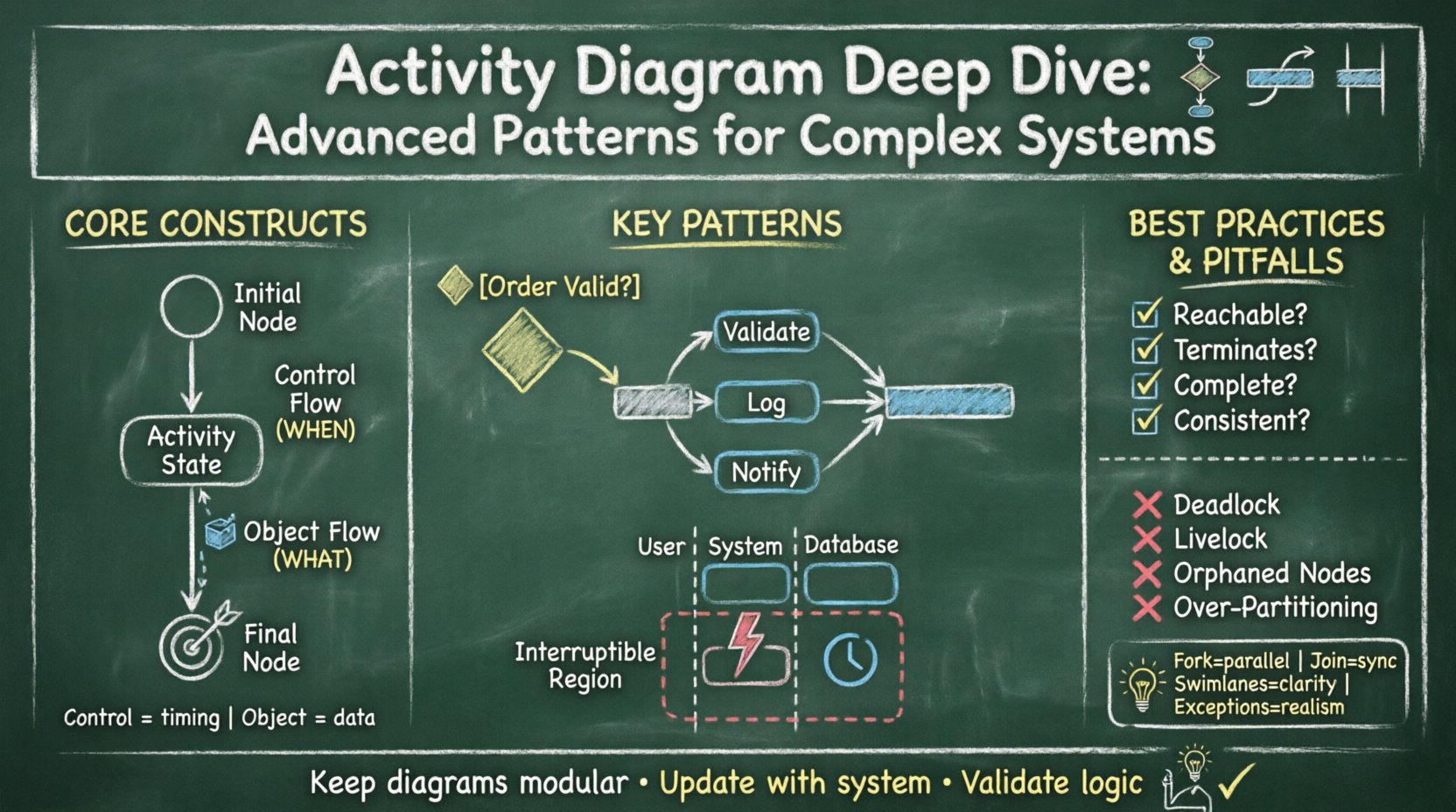
Activity diagrams represent the behavioral aspect of a system, illustrating the flow of control from one activity to another. They serve as a critical bridge between high-level business processes and detailed technical implementation. When dealing with complex systems, standard flows often prove insufficient. Advanced patterns become necessary to model concurrency, exception handling, and intricate data dependencies without ambiguity.
This guide explores the structural nuances of activity diagrams. We move beyond basic sequences to examine how to model robust, scalable, and maintainable workflows. The focus remains on the semantics of the notation and the logical integrity of the design.
🧩 Core Constructs and Semantics
Before diving into advanced patterns, a firm grasp of foundational elements is required. Every diagram consists of nodes and edges. The nodes represent activities, states, or decisions, while the edges define the transitions.
- Initial Node: The starting point of the flow. It is typically represented by a filled circle.
- Activity State: A period of processing or an action. This is the workhorse of the diagram.
- Final Node: The termination of the flow. Multiple final nodes can exist to indicate different end states.
- Control Flow: The mechanism that passes control from one activity to the next. It is directional and triggers the subsequent activity.
- Object Flow: The mechanism that passes data or objects between activities. This distinguishes the process from the information it manipulates.
Understanding the distinction between control flow and object flow is vital. Control flow dictates when something happens. Object flow dictates what is being processed. Confusing these two leads to models that are difficult to validate against actual system behavior.
⚡ Control Flow Logic: Decisions and Merges
Complex systems rarely follow a linear path. Conditional logic introduces branching. To manage this, specific nodes are employed to direct the flow based on guard conditions.
Decision Nodes
A decision node acts as a diamond shape. It has one incoming control flow and multiple outgoing flows. Each outgoing flow must be labeled with a guard condition in square brackets. For example, [Order Valid] or [Inventory Available].
- Only one outgoing path is taken if the condition is met.
- If no condition is met, the flow halts unless a default path is defined.
- Guard conditions should be mutually exclusive and collectively exhaustive to avoid deadlocks.
Merge Nodes
A merge node combines multiple incoming flows into a single outgoing flow. It does not contain logic; it simply synchronizes the paths that diverged earlier.
- Ensure the merge node does not introduce ambiguity about the origin of the control.
- Use merge nodes to consolidate branches that perform different actions but converge on a common state.
🔄 Concurrency: Fork and Join
One of the most powerful features of activity diagrams is the ability to model parallelism. In complex systems, multiple processes often occur simultaneously. Fork and Join nodes are the standard mechanism for this.
Fork Nodes
A fork node splits a single incoming flow into multiple outgoing flows. These outgoing flows are concurrent. This implies that the activities following the fork will execute in parallel, independent of one another.
- Visualized as a thick horizontal or vertical bar.
- Used to model parallel tasks, such as validating a user and logging an audit trail simultaneously.
- Ensure that resources required by parallel activities are managed correctly in the system architecture.
Join Nodes
A join node waits for all incoming flows to arrive before proceeding. It synchronizes the parallel activities.
- Also visualized as a thick bar, opposite to the fork.
- Represents a barrier where all parallel threads must complete before the next step begins.
- Crucial for ensuring data consistency before moving to the next phase of the process.
| Feature |
Fork Node |
Join Node |
| Function |
Splits one flow into many |
Combines many flows into one |
| Timing |
Immediate split |
Wait for all inputs |
| Concurrency |
Enables parallel execution |
Ensures synchronization |
| Visual |
Thick bar (split) |
Thick bar (merge) |
🏊 Swimlanes: Partitioning and Responsibility
As systems grow, diagrams become cluttered. Swimlanes (or partitions) organize activities by responsibility. Each lane represents a specific actor, role, or subsystem.
Benefits of Swimlanes
- Clarity: It is immediately obvious which component is responsible for a specific action.
- Communication: Stakeholders can identify their own workflows within the larger system.
- Handoffs: Transitions between lanes highlight integration points and potential bottlenecks.
Best Practices for Partitioning
- Keep lanes logical. Do not create a lane for every single micro-service unless necessary.
- Minimize crossing lines. If control flows frequently cross between lanes, the partitioning might need adjustment.
- Ensure the initial node resides in the lane responsible for initiating the process.
- Ensure the final node resides in the lane responsible for concluding the process.
📦 Object Flow and Data Management
Control flow tells the story of the process, but object flow tells the story of the data. In complex systems, the state of data often dictates the flow of control.
Object Nodes
Object nodes represent the existence of data. They can be input, output, or intermediate states.
- Input Object: The object enters the activity.
- Output Object: The object leaves the activity.
- Intermediate Object: The object exists between two activities.
Data Coupling
Object flows connect activities that manipulate the same data. This is distinct from control flows. An activity might wait for a control flow to start but cannot produce an output object without the correct input object.
- Use object flows to visualize dependencies between data entities.
- Ensure that the lifecycle of the object is managed correctly across the diagram.
- Avoid creating cycles in object flow unless the data state is explicitly intended to change cyclically.
🛡️ Advanced Patterns: Exception and Interrupt
Real-world systems encounter errors. A robust diagram accounts for failure paths. Standard flows often ignore exceptions, leading to optimistic models that fail in production.
Exception Handling
Activities can have associated exception handlers. These are invoked when the activity fails. The flow diverts from the main path to a recovery or logging routine.
- Define clear entry points for exceptions.
- Ensure that exceptions do not create infinite loops.
- Document the specific error conditions that trigger the handler.
Interruptible Regions
An interruptible region is a container that holds activities that can be interrupted by a specific signal. When the signal is received, the activities inside the region are aborted, and control moves to the exit of the region.
- Useful for modeling timeouts or cancellation requests.
- Visualized as a dashed box surrounding the activities.
- Ensure that the interruption logic is consistent across the system design.
🔗 Nested Activity
Complex systems often have sub-processes. Instead of drawing every detail on one large diagram, nested activities are used.
- A nested activity is represented by an activity node with a small icon in the corner.
- Clicking this icon opens a new diagram containing the detailed flow.
- This promotes modularity and keeps the high-level view clean.
- Ensure that the entry and exit points of the nested activity match the parent context.
🚫 Common Anti-Patterns
Even experienced modelers fall into traps. Avoiding these common mistakes ensures the diagram remains a useful artifact.
- Deadlocks: Occur when a join node waits for a fork node that never completes due to a blocked path.
- Livelocks: Occur when the flow cycles endlessly without making progress.
- Orphaned Nodes: Activities that have no incoming or outgoing flows are unreachable and useless.
- Over-Partitioning: Creating too many swimlanes makes the diagram unreadable. Group related responsibilities.
- Mixing Control and Object Flow: Do not use control flow lines to represent data movement.
📋 Validation and Consistency
Once a diagram is created, it must be validated against the system requirements.
- Reachability: Can every node be reached from the initial node?
- Termination: Can every path eventually reach a final node?
- Completeness: Are all business rules represented?
- Consistency: Does the diagram align with state diagrams and sequence diagrams?
🛠️ Maintenance and Evolution
Systems evolve. The diagram must evolve with them. Maintaining activity diagrams requires discipline.
- Update diagrams whenever process logic changes.
- Use version control for diagram files to track changes over time.
- Review diagrams during sprint planning to ensure alignment with implementation.
- Remove deprecated flows to reduce cognitive load.
🌐 Integration with System Design
Activity diagrams do not exist in isolation. They interact with other modeling techniques.
- State Diagrams: Use activity diagrams for the internal behavior of a state.
- Sequence Diagrams: Use activity diagrams to define the logic that sequence diagrams implement.
- Class Diagrams: Ensure that the objects flowing in the activity diagram match the classes in the class diagram.
🔑 Key Takeaways
- Control flow dictates the order of execution, while object flow dictates data movement.
- Fork and join nodes are essential for modeling concurrency and synchronization.
- Swimlanes clarify responsibility but should not be overused.
- Exception handling and interruptible regions make the model realistic.
- Validation ensures the diagram accurately reflects the system logic.
- Maintain diagrams as living documents that evolve with the system.
By adhering to these patterns and principles, designers can create activity diagrams that serve as reliable blueprints for complex systems. The goal is clarity, accuracy, and maintainability.