
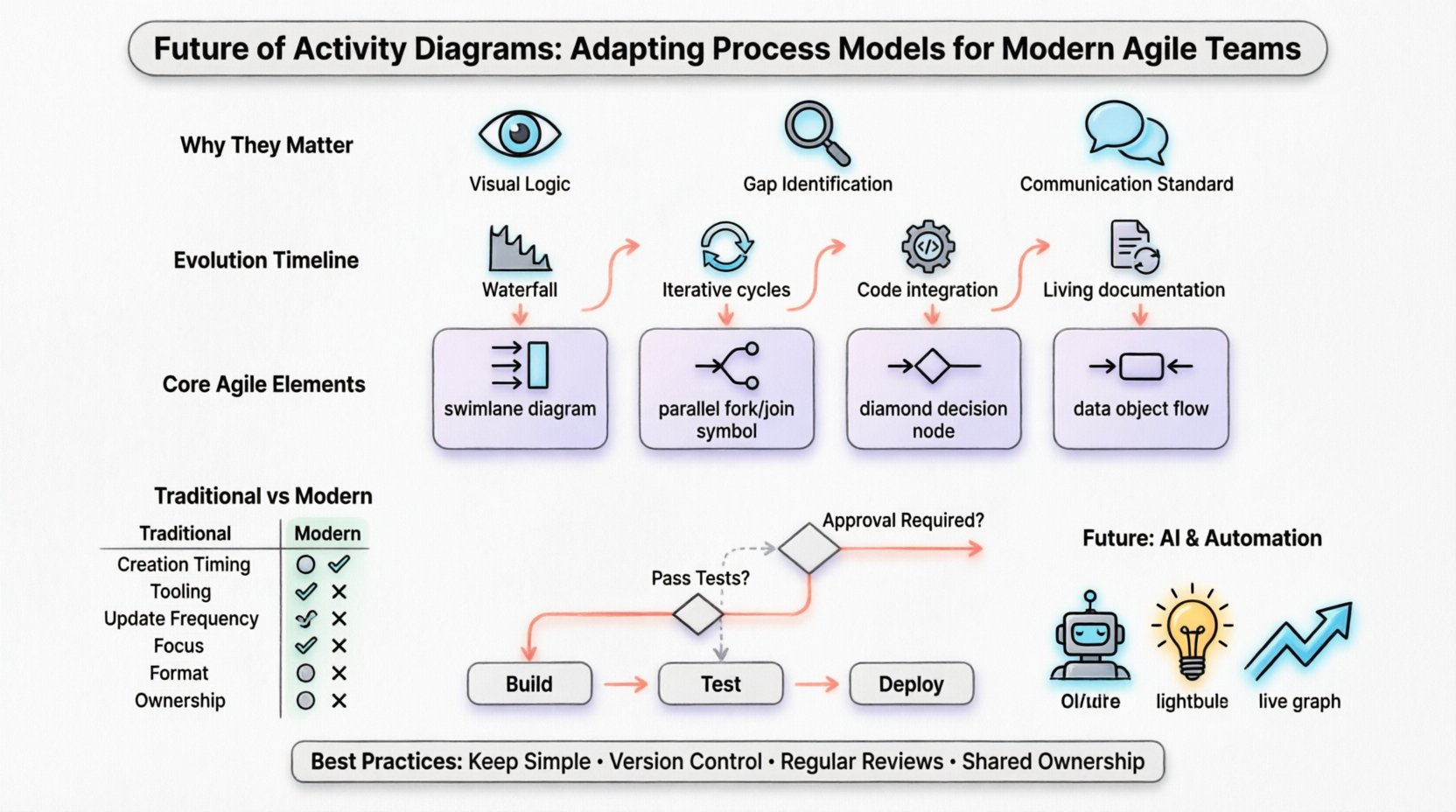
The landscape of software development has shifted dramatically. While methodologies have evolved from rigid waterfalls to fluid agile frameworks, the need for clear process visualization remains constant. Activity diagrams, once the domain of heavy documentation phases, are finding new life within modern development cycles. They serve as a bridge between abstract logic and concrete implementation, ensuring that teams maintain clarity amidst complexity.
This guide explores how these process models are adapting to meet the demands of continuous delivery, microservices architecture, and cross-functional collaboration. We will examine the mechanics of effective diagramming in an agile context, avoiding the pitfalls of over-documentation while retaining the structural integrity necessary for robust system design.
In an era dominated by user stories and sprint backlogs, some question the value of detailed process modeling. However, the core function of an activity diagram is to reduce cognitive load. When a team tackles a complex workflow, text alone often fails to capture the nuances of concurrency, decision points, and parallel execution.
The goal is not to create artifacts for the sake of compliance, but to build living documents that guide development. When integrated correctly, these diagrams act as a single source of truth for system behavior.
Traditional activity diagrams were often created upfront and rarely updated. This “big design up front” approach clashed with agile principles. The modern approach treats diagrams as dynamic artifacts that evolve alongside the codebase.
In legacy environments, diagrams were blueprints built before a single line of code was written. Today, they are often generated or refined during the sprint. They represent the current state of the system, allowing for refactoring without losing track of the intended workflow.
The separation between design and implementation is narrowing. Some teams utilize modeling tools that can generate skeleton code or validate existing code against the visual model. This ensures that the diagram remains an accurate reflection of the software.
Static PDFs are obsolete for agile teams. Diagrams should reside in the version control repository, linked directly to user stories or epics. When a feature changes, the diagram updates. This creates a feedback loop where documentation validates the code, and code validates the documentation.
To make activity diagrams effective in a modern setting, specific elements must be emphasized. The focus shifts from high-level business processes to technical execution flows.
Understanding the shift in mindset is crucial. The table below outlines the differences between legacy practices and agile-adapted modeling.
| Feature | Traditional Approach | Modern Agile Approach |
|---|---|---|
| Creation Timing | Before development begins | Iterative, during sprint cycles |
| Tooling | Heavy standalone modeling software | Integrated within dev environments or wikis |
| Update Frequency | Once, at project start | As code changes occur |
| Focus | Business process compliance | Technical workflow and system behavior |
| Format | Static images or PDFs | Version-controlled, linked assets |
| Ownership | System Architects | Entire cross-functional team |
One of the most significant shifts is the connection between visualization and automation. Continuous Integration and Continuous Deployment pipelines rely on precise logic to function correctly. Activity diagrams can serve as the visual specification for these pipelines.
Instead of writing complex configuration files alone, teams can map out the build, test, and deploy stages using activity diagrams. This makes the pipeline logic transparent to non-technical stakeholders, such as product managers, who need to understand deployment gates.
Decision nodes in the diagram can correspond to automated test gates. If a specific condition is met in the diagram, it translates to a test requirement in the pipeline. This alignment ensures that the visual model predicts the actual execution path.
When a deployment fails, the activity diagram acts as a troubleshooting map. Teams can trace the flow to see exactly where the process diverged from the expected path. This reduces mean time to resolution during outages.
As systems move toward microservices, linear flow becomes the exception rather than the rule. Activity diagrams must evolve to represent distributed systems accurately.
When modeling concurrent processes, ensure that join nodes are clearly defined. In distributed systems, waiting for multiple parallel tasks to complete can introduce race conditions. The diagram should highlight these synchronization points so developers can implement proper locking mechanisms.
The true power of activity diagrams lies in collaboration. They are not just for architects; they are conversation starters for the whole team.
Start with a rough sketch during sprint planning. Use a digital whiteboard to map out the user journey. This allows for immediate feedback and correction before any formal modeling begins.
Include QA engineers in the diagramming process. They can identify paths that are difficult to test. If a branch in the diagram is too complex, it might be a sign that the feature needs simplification for better testability.
For new team members, activity diagrams provide a quick overview of system interactions. Instead of reading through hundreds of lines of code, a new developer can review the workflow to understand how components interact.
Even with the best intentions, teams often struggle to maintain effective process models. Being aware of these common issues can prevent wasted effort.
The future of activity diagrams involves increased automation. Artificial intelligence and machine learning are beginning to assist in the creation and maintenance of process models.
Tools are emerging that can analyze code repositories and suggest activity diagrams. This reduces the manual burden of drawing and ensures the diagram reflects the actual code logic.
AI can analyze a workflow and suggest optimizations. For example, it might identify a redundant step or a potential bottleneck in the flow that a human might miss.
In the future, diagrams may update in real-time as the system runs. This provides a live view of operational metrics overlaid on the process model, allowing teams to see where delays actually occur in production.
Maintaining these models requires discipline. Here are actionable steps to ensure longevity.
Remote and distributed teams face unique challenges. Activity diagrams become even more critical when face-to-face communication is absent.
The integration of activity diagrams into modern agile workflows is not about returning to the past. It is about adopting a visual discipline that supports speed and reliability. By treating these models as living documents, teams can maintain clarity without sacrificing agility.
The evolution of activity diagrams reflects the broader maturation of software engineering. We have moved from viewing documentation as a burden to viewing it as a strategic asset. When done correctly, these diagrams empower teams to build complex systems with confidence.
Focus on clarity, keep the models updated, and use them to facilitate conversation rather than replace it. In a world of rapid change, the ability to visualize the path forward remains an essential skill for any technical team.
By embracing these practices, organizations can ensure that their process models support, rather than hinder, their delivery capabilities. The future belongs to teams that can balance the need for structure with the freedom to innovate.
 From Text to Flow: A Step-by-Step Tutorial for Converting Requirements into Activity Diagrams
 Deep Dive into Activity Diagram Symbols: What Every Analyst Needs to Know
 Avoiding Dead Ends: A Strategic Guide to Activity Diagram Flow Control
 Activity Diagram Validation: Ensuring Your Models Match Actual Business Needs