
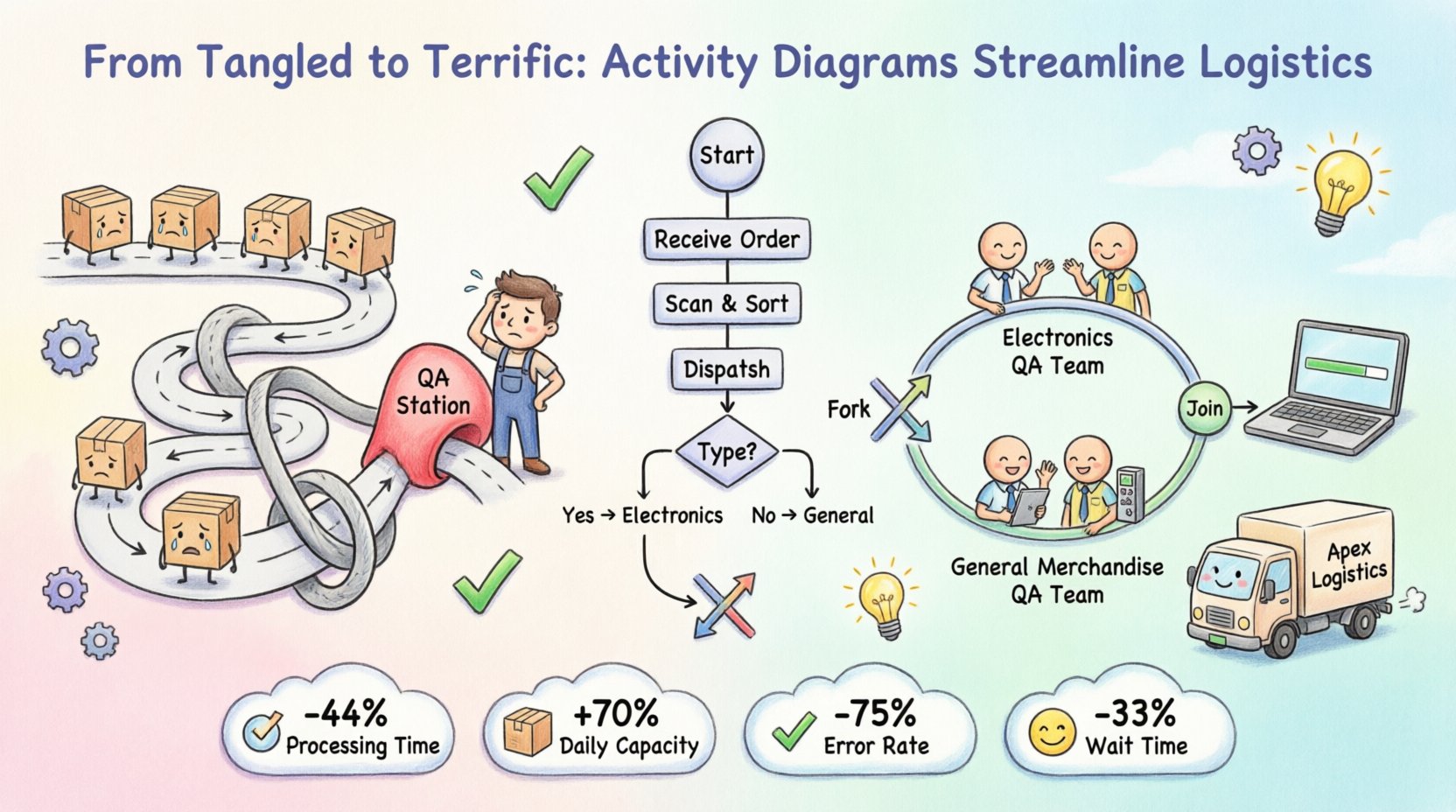
Business operations often resemble a tangled web of interactions. Departments work in silos, information gets lost in handoffs, and bottlenecks emerge where they least expected. To navigate this complexity, organizations need a clear map of their workflows. This is where the activity diagram becomes indispensable. It is not just a drawing; it is a logical representation of the flow of control and data.
In this deep dive, we explore a real-world scenario involving a mid-sized logistics provider. We will examine how mapping their internal processes using activity diagrams revealed critical inefficiencies and guided a structural overhaul. This guide avoids tool-specific jargon and focuses on the universal principles of process visualization and optimization.
Before analyzing the case study, it is necessary to establish a solid foundation regarding the anatomy of an activity diagram. Think of it as a flowchart on steroids. While a standard flowchart shows logic, an activity diagram captures concurrency, state, and the passing of objects.
Every diagram relies on specific nodes and edges. Understanding these elements allows for precise modeling.
Standard documentation often describes processes in text. Text is linear and can be ambiguous. Visual models reduce cognitive load. They allow stakeholders to see the big picture without getting lost in paragraphs of text.
Apex Logistics is a fictionalized representation of a typical distribution center facing growth pains. They handle high volumes of returns and exchanges, which creates a complex workflow. The process involves inventory checks, quality assurance, data entry, and restocking.
Over a six-month period, Apex experienced a 15% increase in processing time for returns. Customer complaints rose in tandem. Management suspected a bottleneck, but the manual logs did not reveal where the delay occurred. The process was too complex to track mentally.
Key Issues Identified:
The first step in solving the problem was to model the existing process. This required interviewing staff from receiving, quality control, and data entry. The goal was to capture the reality, not the ideal.
Goods arrive at the dock. The receiving team logs the shipment. Each item is scanned. If the item is flagged as a return, it moves to the returns lane. If it is a new shipment, it moves to the inventory lane.
This is where the complexity began. Every returned item went to a Quality Assurance (QA) station. The QA team inspected the item for damage. This step was sequential for every single item, creating a queue.
Once the item passed QA, it moved to data entry. The system needed to be updated to reflect the item’s status. After updating, the item was physically moved to the shelf.
Visualizing the Flow:
When these steps were drawn into an activity diagram, the following patterns emerged:
With the “As-Is” diagram complete, the team could analyze the flow. The diagram revealed a critical flaw: the process was linear when it should have been parallel.
In the diagram, the flow looked like a straight line:
Receive ➔ Inspect ➔ Update Data ➔ Restock
However, the data update does not require the physical item to be present at the same time. The inspection does not require the data update to finish.
The diagram highlighted that only one QA station was active for all items. This created a single point of failure. If the QA station was busy, the receiving team had to stop accepting returns.
Analysis of the Diagram Nodes:
Using the insights from the initial diagram, the team designed a new workflow. The goal was to introduce concurrency where possible and automate decision logic.
The new diagram utilized fork and join nodes. This allowed the process to split into parallel streams.
These streams run simultaneously. They join only when the item is ready for restocking. This reduces the total time significantly.
The decision node for “Damaged Goods” was clarified. The diagram now included a sub-process for damage assessment that used predefined criteria.
By defining these paths clearly in the diagram, staff no longer had to guess the next step.
Translating the diagram into action required organizational changes. The team restructured the workflow to match the new visual model.
The physical layout of the warehouse was adjusted to support the diagram’s flow.
After implementing the changes modeled by the activity diagram, the team tracked key performance indicators. The results validated the effectiveness of the process modeling.
| Metric | Before Optimization | After Optimization | Change |
|---|---|---|---|
| Processing Time per Item | 25 Minutes | 14 Minutes | -44% |
| Daily Capacity | 500 Items | 850 Items | +70% |
| Error Rate | 8.5% | 2.1% | -75% |
| Customer Wait Time | 72 Hours | 48 Hours | -33% |
While the case study was successful, many organizations struggle when creating activity diagrams. Avoiding these common errors ensures the model remains useful.
Do not try to model every single click or button press. Focus on the business logic. If a step is trivial, group it with the surrounding actions. A diagram with 100 nodes is harder to read than one with 20.
Happy paths are easy. Unhappy paths (errors, cancellations, returns) are where the real value lies. Always include the “What if this fails?” branches in your diagram.
A diagram created in a vacuum is often wrong. Review the model with the people actually doing the work. They will spot logical gaps that management misses.
Business processes evolve. If the diagram is not updated, it becomes obsolete. Treat the diagram as a living document.
For highly complex environments, standard activity diagrams may need augmentation. Here are advanced techniques to consider.
Swimlanes organize activities by the responsible party. This clarifies accountability.
By placing the activity in the correct lane, you immediately see who owns the step. In the Apex case, swimlanes could have shown exactly which department caused the delay.
Control flow shows the sequence of actions. Object flow shows the movement of data or physical items. Distinguishing between the two is vital.
Using both types of flows together provides a complete picture of the system.
The activity diagram is not a one-time project. It is a tool for continuous improvement. It fits well into methodologies like Lean and Six Sigma.
When a process fails, trace the activity diagram backward from the failure point. This helps identify exactly where the deviation occurred.
Use your diagrams to compare your process against industry standards. If a step in your diagram takes significantly longer than the industry norm, investigate why.
Complex business processes require more than just good intentions. They require a structured approach to understanding and improvement. Activity diagrams provide that structure. They turn abstract chaos into concrete logic.
In the Apex Logistics case, the shift from a linear mental model to a parallel visual model changed the outcome. It reduced costs, improved speed, and enhanced customer satisfaction. The diagram served as the blueprint for change.
Organizations that invest time in modeling their processes correctly gain a competitive advantage. They can adapt faster, communicate clearer, and execute more efficiently. The activity diagram is a bridge between strategy and execution. It turns the invisible flow of work into something visible, measurable, and improvable.
Start by mapping one critical process. Keep it simple. Focus on the flow. Review it with your team. You will likely find areas for improvement that were previously hidden in plain sight. The path to efficiency starts with a clear view of the current state.
By following these steps, you ensure that your process modeling adds real value. It becomes a tool for growth rather than just a document on a shelf.