
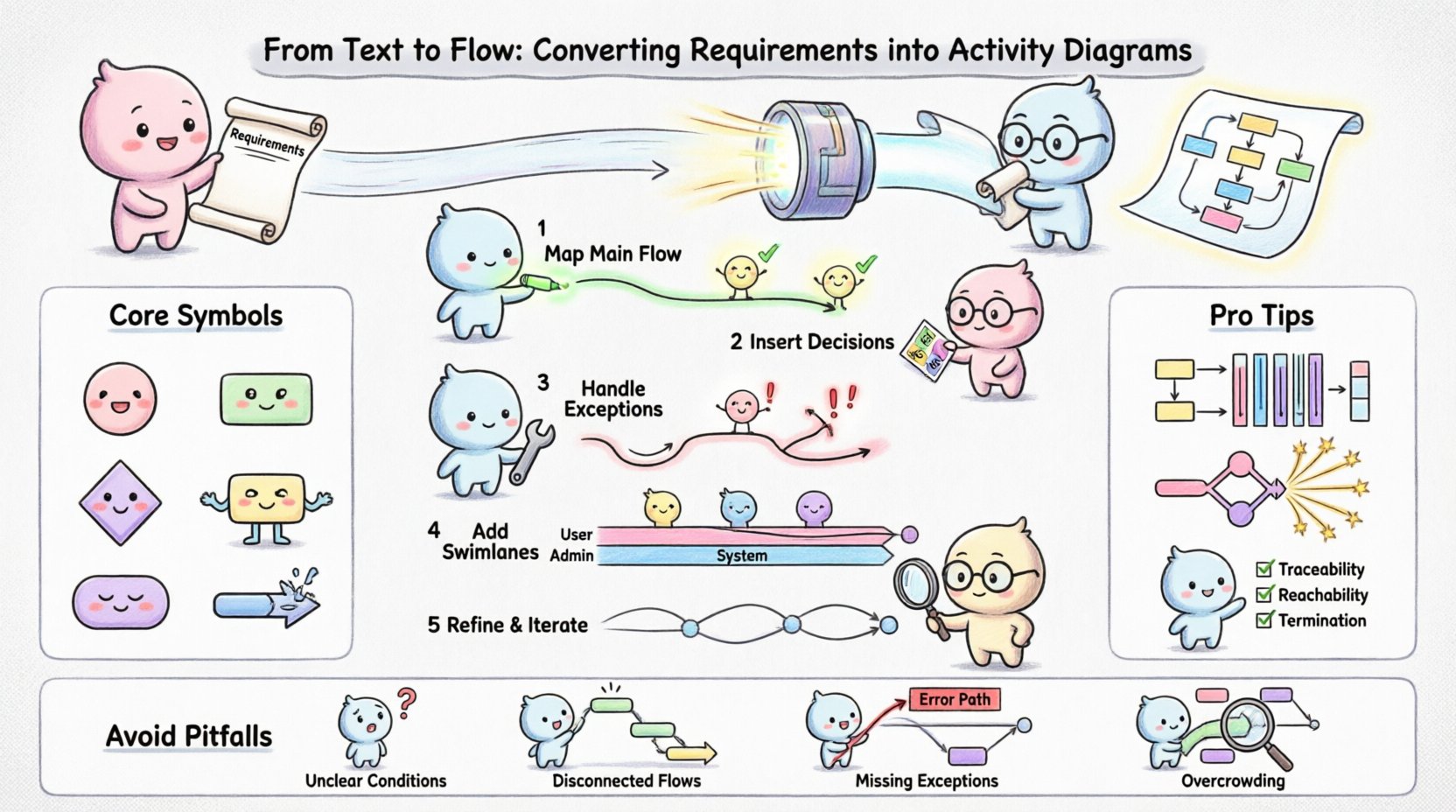
In systems engineering and software development, the gap between written requirements and technical implementation often leads to misunderstandings. Stakeholders provide text, developers provide logic, and the connection between the two must be precise. This is where activity diagrams become indispensable. They serve as the visual bridge, translating static text into dynamic flow.
This guide details the process of converting requirements into activity diagrams. We will explore the semantics of process modeling, the logic of control flow, and the structural elements that make a diagram readable and accurate. By the end of this tutorial, you will understand how to map text to symbols effectively without relying on specific tools.
Textual requirements are linear and sequential. They describe what happens, but often fail to describe how decisions branch or how parallel tasks interact. Humans process visual information significantly faster than text. An activity diagram compresses pages of documentation into a single view of logic.
When you convert requirements to a flow, you are not just drawing; you are verifying logic. This process exposes edge cases that text descriptions often overlook. For instance, a requirement might state, “Process the order,” but fail to specify what happens if the inventory check fails. A diagram forces you to define that alternative path.
Before drawing a single shape, the source material must be analyzed. Raw requirements often contain noise. You need to extract the core actions, decisions, and data movements.
Who performs the actions? Is it a user, a system, an external service, or a specific department? Identifying these entities early helps structure the diagram later using swimlanes. If a requirement mentions “Admin approves,” the “Admin” is a distinct lane.
Scan the text for verbs. “Submit,” “Calculate,” “Notify,” “Verify.” These become the primary activity nodes. Ignore static attributes like “The system must be fast.” That is a constraint, not a flow action.
Every process has an entry and an exit. Look for triggers like “User clicks button” or “Scheduled time arrives.” These mark the initial node. Look for terminations like “Order completed” or “Error logged.” These mark the final nodes.
Activity diagrams rely on a standardized set of symbols. While software tools render these, the underlying logic remains the same regardless of the platform. Understanding the semantics of each shape is critical for accurate modeling.
| Symbol | Shape | Function |
|---|---|---|
| Initial Node | Solid Circle | Start of the process |
| Activity | Rounded Rectangle | Execution of a task or action |
| Decision Node | Diamond | Branching logic based on conditions |
| Fork/Join Node | Thick Bar | Splitting or merging concurrent flows |
| Final Node | Double Circle | End of the process |
| Control Flow | Arrow | Direction of execution |
It is important to distinguish between a Decision Node and a Join Node. A decision node splits one flow into multiple alternatives. A join node merges multiple flows into one. Confusing these leads to logical errors in the model.
Transforming text into a diagram is a systematic process. Follow these steps to ensure fidelity to the original requirements.
Start with the happy path. This is the sequence of events that occurs when everything goes according to plan. Ignore exceptions for now. Draw the initial node, connect the primary activities in order, and end with the final node. This establishes the backbone of the diagram.
Re-read the requirements for conditional statements. Look for keywords like “if,” “unless,” “when,” or “whether.” Attach a diamond shape to the activity preceding the condition. Label the outgoing branches with the conditions (e.g., “Valid?” Yes/No).
Now, address the unhappy paths. Requirements often state, “If payment fails, notify user.” Connect the “No” branch of your decision diamond to an activity representing the failure handling. Ensure every branch eventually leads to a termination point or loops back to a recovery step.
Vertical or horizontal lines divide the diagram into lanes. Assign each lane to a specific actor identified in the preparation phase. Move activities into the corresponding lanes. This visualizes handoffs. For example, the “Submit Form” activity sits in the “User” lane, while “Database Update” sits in the “System” lane.
Review the draft against the original text. Does every requirement have a representation? Are there orphaned activities with no incoming flow? Are there dead ends? Refine the connections to ensure logical continuity.
As requirements grow, a single list of steps becomes unwieldy. Swimlanes introduce organization. They answer the question: “Who is responsible for this step?”
When creating swimlanes, consider the granularity of the process. Too few lanes make the diagram crowded. Too many lanes make it fragmented. Aim for logical groups, such as “Frontend,” “Backend,” and “Database.”
Handoffs between lanes are critical moments to inspect. A control flow crossing a swimlane boundary represents a communication event. Ensure that the receiving lane has an entry point ready to accept that input. If a flow crosses into a lane and has nowhere to go, the process is broken.
Best Practices for Swimlanes:
Real-world systems rarely execute tasks in a strictly linear fashion. Some processes happen simultaneously. Activity diagrams support this through Fork and Join nodes.
When a requirement states “Send email and update log,” these can happen at the same time. A thick bar (Fork) splits the control flow into two parallel threads. Each thread performs its task independently. A second thick bar (Join) merges them back together once both are complete. This implies that the next step waits for both threads to finish.
Sometimes, a task triggers an action that does not block the main flow. For example, “Upload file” might trigger a “Send notification” in the background. In the diagram, this looks like a fork where one branch continues the main process immediately, while the other branch handles the background task. This distinction is vital for understanding system responsiveness.
Once the diagram is drawn, it must be validated. A diagram is a model, not the implementation. It needs to be checked for accuracy and completeness.
Walk through the diagram with a colleague. Ask them to trace a path from start to finish. If they get stuck or confused, the diagram needs simplification. The goal is clarity, not complexity.
Even experienced modelers make mistakes. Being aware of common errors saves time during the review phase.
| Pitfall | Description | Correction |
|---|---|---|
| Unclear Conditions | Decision diamonds lack labels or have vague labels. | Label every branch with a specific condition (e.g., “Stock > 0”). |
| Disconnected Flows | Arrows cross without connecting to a node. | Ensure all arrows connect to a node or another arrow head. |
| Missing Exceptions | Only the happy path is drawn. | Explicitly model error handling and fallback paths. |
| Overcrowding | Too many details in one view. | Break complex processes into sub-diagrams or use object flows. |
Another common issue is mixing data flow with control flow. Activity diagrams primarily show control flow (the order of execution). While data objects can be represented, do not confuse the movement of data with the movement of logic. Keep the focus on the sequence of actions.
Converting requirements into activity diagrams is a discipline of precision. It requires translating the fluidity of natural language into the rigidity of logic. This translation process improves the quality of the final system by exposing logical gaps early.
Remember that diagrams evolve. As requirements change, the diagram must be updated. Maintaining this synchronization ensures that the visual documentation remains a reliable source of truth. Avoid treating the diagram as a one-time artifact. Treat it as a living document that reflects the system’s behavior.
By adhering to standard notations, utilizing swimlanes for clarity, and rigorously validating paths, you create a model that serves both technical and business audiences. This shared understanding reduces rework and accelerates development. The effort invested in modeling pays dividends in system reliability and maintainability.
Start with the requirements, map the flow, and refine the logic. The result is a clear, actionable blueprint for your system’s operation.